


Flux Lang
A light multilingual layer for WordPress: Turkish by default, English at /en/, AI translation through Flux AI.
Flux Lang makes the site multilingual without a heavy plugin. Each post, page, project or event can have its own English (or German…) version with its own slug, image and SEO; menus and links follow the language, and the language switcher sits in the footer. Visitors from outside Turkey land on English right away, and Flux AI can translate a page in one click.
- Free and open source (GPL)
- WordPress 6.4+ · PHP 7.4+
- English & Turkish
- Content & growth
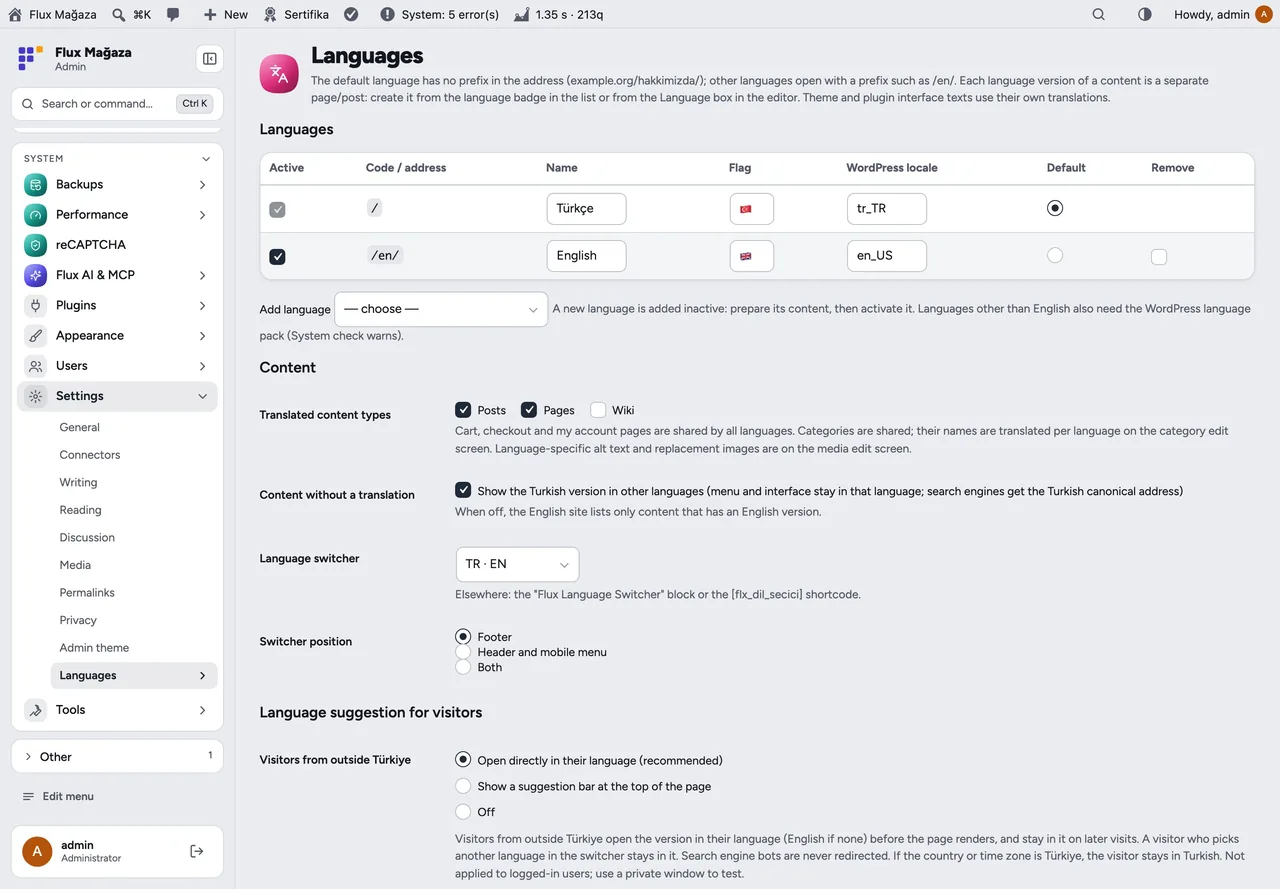

Flux Lang in action
The real plugin, real screens. A short tour.
Why Flux Lang?
Multilingual plugins tend to be the heaviest thing on a WordPress site: extra tables, rewrite rules, a string translation screen with thousands of rows. A charity with Turkish content and an international audience needs less:
-
English where it matters
Translate the pages that count; anything not yet translated still opens in Turkish under /en/ instead of a 404.
-
Links that follow the language
Menus, buttons and links in content point to the English version automatically, without touching the theme.
-
The right language first time
Visitors from abroad get English before the page is drawn; their choice in the switcher is remembered.
-
Translation in one click
With Flux AI the title, excerpt, SEO fields and body are translated piece by piece and opened in the editor for a check.
Flux Lang screenshots
Real screens from the demo site. Click to enlarge.
Flux Lang features
Multilingual WordPress plugin, WPML alternative
Content
- Separate language version per post, page, project and event: own title, body, slug, featured image and SEO.
- Language badges in the lists: own language, translated, draft, or +EN to create the translation.
- Language box in the editor: language, translations, Copy and translate or Translate with AI.
- Category and tag names and descriptions per language; per-language image alt text and “show this image in English”.
- Home page, posts page and WooCommerce pages mapped per language; cart, checkout and account are shared; orders store the visitor’s language.
Site
- Default language without prefix, others under
/en/…; no rewrite flush needed. Theme and plugin texts come from their own translations. - Site name, tagline and Flux SEO home title per language.
- Language switcher in the footer (or header / mobile menu), a block and the
[flx_dil_secici]shortcode. - Visitors outside Turkey go straight to English (Cloudflare country header or time zone), bots excluded; optional suggestion bar instead.
SEO and AI
hreflang+x-default,og:locale:alternate, canonical, all languages in the sitemap; fallback pages point canonical to Turkish.- Tools for Flux AI and MCP:
flxl_languages,flxl_untranslated,flxl_save_translation,flxl_set_language,flxl_image_language,flxl_term_translation,flxl_site_texts;langon Flux SEO content tools. - REST:
langandtranslationsfields,?lang=enfilter.
Up and running in a few minutes
- Activate Flux Lang and open Settings › Languages: English is on with recommended settings; save.
- Under Site texts by language › English set the site name, tagline and home title.
- Open Pages, click +EN next to a page, translate (or Translate with AI) and publish.
- Purge the page cache and open
/en/.
Requirements: Optional: Flux AI for one-click translation, Flux SEO for per-language SEO, WooCommerce.
Frequently asked questions
Didn't find your answer? Write to us. hello@fluxwp.com
Is Flux Lang free?
Yes. Flux Lang is free and open source (GPL-2.0-or-later). There is no licence key and nothing is locked; the source code is on GitHub.
How do I install Flux Lang?
Install Flux Setup, then press Install on the Flux Lang row under Flux Setup › Packages. Updates arrive in the standard WordPress Updates screen.
What does Flux Lang need?
WordPress 6.4 or later and PHP 7.4 or later. Shared hosting is enough. Optional: Flux AI for one-click translation, Flux SEO for per-language SEO, WooCommerce.
Does Flux Lang work with other plugins?
Flux Lang works on its own. Installed with other FluxWP plugins it shares the same panel, roles, colours and AI settings, for example with Flux AI, Flux SEO, and Flux Analytics.
Is Flux Lang available in Turkish?
Yes. The interface follows the site language: English and Turkish are included, and other languages can be added with a translation file.
Works well with Flux Lang
One panel, one look, one settings screen. Add more as you need them.
-

Flux AI
Admin & platformAI for WordPress in one hub: OpenRouter and Anthropic keys, model catalog, budgets and prompt cache for every plugin.
Details -
Flux SEO
Content & growthWordPress SEO plugin: meta titles and descriptions, canonical, Open Graph, schema, XML sitemap, IndexNow and an SEO check for every page.
Details -
Flux Analytics
Content & growthCookie-free analytics, a privacy-friendly Google Analytics alternative: visitors, top pages, referrers, devices and campaigns.
Details



Start with one plugin. Grow into the whole toolkit.
Install open source FluxWP on your own server for free, or let us host and set it up for you.