

Flux Tasks
Task and project tracking inside WordPress: lists, boards, calendars, meetings and docs, with an AI assistant.
Flux Tasks gives the team one place to plan work without another subscription: projects, folders and lists; list, board and calendar views; subtasks, comments with files, notifications and permissions. Meeting lists produce a PDF report, docs are edited block by block, and an assistant on Flux AI can create, update and summarise tasks.
- Free and open source (GPL)
- WordPress 6.5+ · PHP 7.4+
- English & Turkish
- Admin & platform
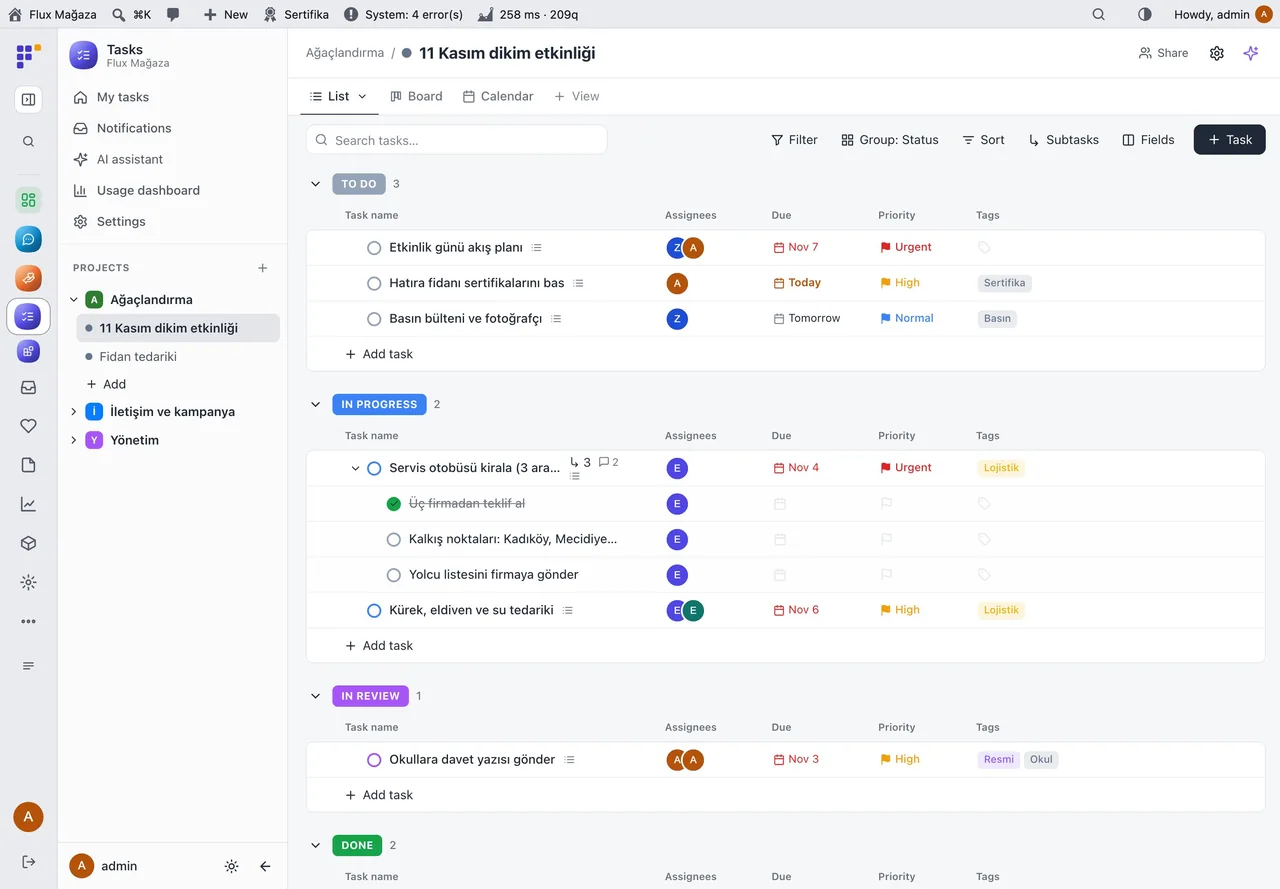
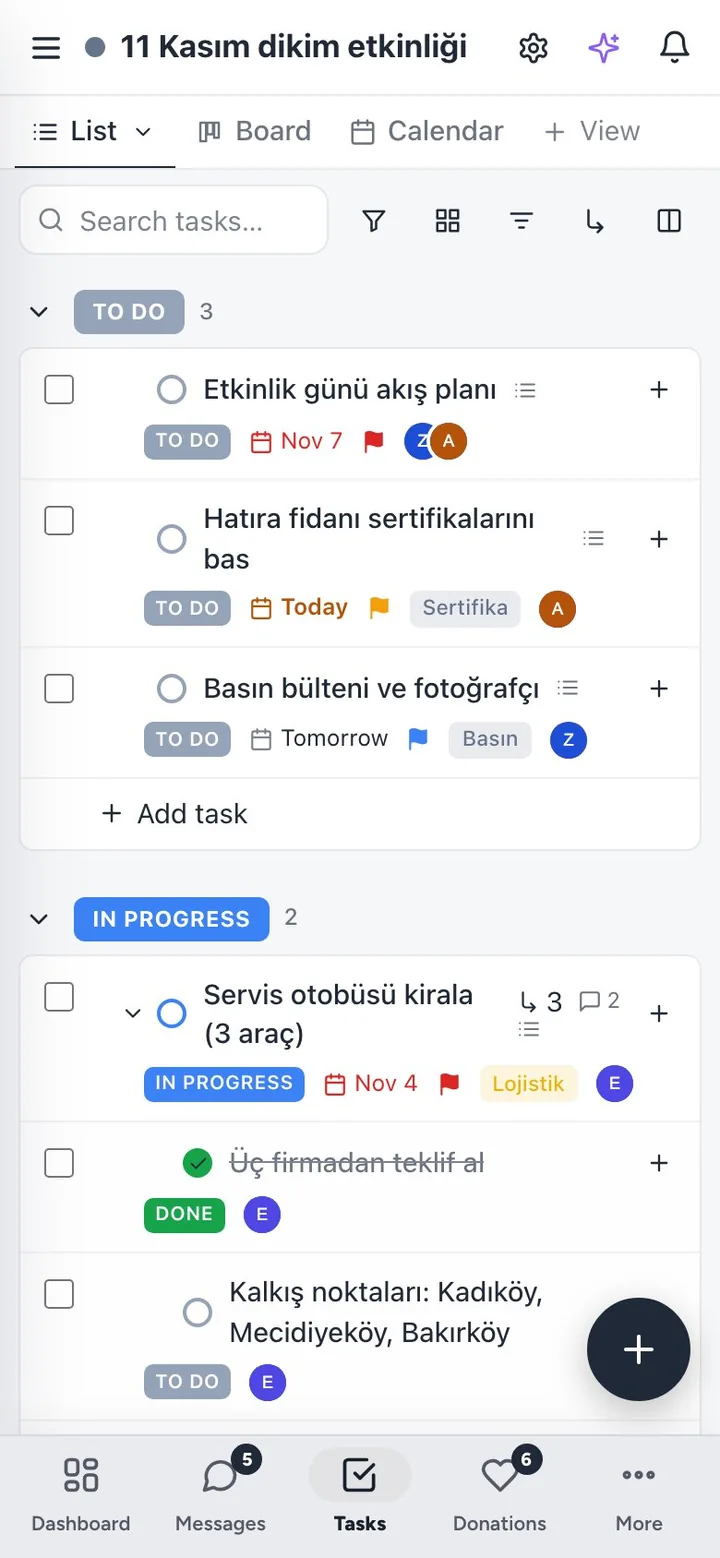
Flux Tasks in action
The real plugin, real screens. A short tour.
Why Flux Tasks?
Volunteer projects live in WhatsApp groups, spreadsheets and memory. A paid project tool means another login and another bill for every volunteer. Flux Tasks runs where the team already signs in:
-
Everything in one list
Who does what by when, with status, priority, tags and custom fields; switch between list, board and calendar.
-
Talk on the task
Comments, mentions, files and an activity log sit on the task, not in a chat that scrolls away.
-
Meetings with minutes
Agenda, decisions and follow-up subtasks in one place, and a branded PDF report at the end.
-
Ask the assistant
“What is overdue this week?”, “Split this into subtasks”, “Summarise the comments”: through Flux AI, and through MCP for Claude.
Flux Tasks screenshots
Real screens from the demo site. Click to enlarge.
Flux Tasks features
WordPress task and project management plugin
Work
- Projects, folders and lists with drag-and-drop ordering and moving; per-list statuses.
- Views: List (grouped, sortable, inline edit), Board (drag between statuses) and Calendar (month, week, agenda); saved, filtered views per person or shared.
- Tasks with assignees, dates, priority, tags, custom fields (text, number, date, select, person, link…), nested subtasks, checklist, cover image.
- My tasks across all projects; notifications for assignment, mention, status, due and overdue.
Collaborate
- Comments with mentions and drag-and-drop files (stored outside public access); activity log; watchers.
- Project and list permissions (view, comment, edit, manage); roles chosen in settings.
- Optional e-mails for assignment, mention and due dates, editable in Flux Mail.
- Meeting lists: agenda, decisions and subtasks, PDF report with logo and status badges.
- Docs: block editor with
/menu, markdown shortcuts, nested pages, tables, task links and an AI menu (continue, summarise, extract to-dos).
Manage
- Usage dashboard: open, overdue and completed tasks, comments, structure, storage per list and per person.
- AI assistant and quick actions through Flux AI; all tools available to the shared Flux AI chat and over MCP.
- Native screen in the Flux App (
flx-tasks/v1/app/*); system checks.
Up and running in a few minutes
- Activate Flux Tasks; Tasks appears in the admin menu with a starter project and list.
- In Tasks › Settings choose which roles can use tasks, create projects and use AI.
- Create a project and a list, add tasks, and switch to Board or Calendar.
Requirements: Optional: Flux AI (assistant), Flux Mail (e-mails), Flux Admin (app mode), Flux App.
Frequently asked questions
Didn't find your answer? Write to us. hello@fluxwp.com
Is Flux Tasks free?
Yes. Flux Tasks is free and open source (GPL-2.0-or-later). There is no licence key and nothing is locked; the source code is on GitHub.
How do I install Flux Tasks?
Install Flux Setup, then press Install on the Flux Tasks row under Flux Setup › Packages. Updates arrive in the standard WordPress Updates screen.
What does Flux Tasks need?
WordPress 6.5 or later and PHP 7.4 or later. Shared hosting is enough. Optional: Flux AI (assistant), Flux Mail (e-mails), Flux Admin (app mode), Flux App.
Does Flux Tasks work with other plugins?
Flux Tasks works on its own. Installed with other FluxWP plugins it shares the same panel, roles, colours and AI settings, for example with Flux Admin, Flux App, and Flux AI.
Is Flux Tasks available in Turkish?
Yes. The interface follows the site language: English and Turkish are included, and other languages can be added with a translation file.
Works well with Flux Tasks
One panel, one look, one settings screen. Add more as you need them.
-

Flux Admin
Admin & platformA redesigned WordPress admin: role-based menu, mobile bottom bar and a command palette.
Details -
Flux App
Admin & platformSign in from the desktop and mobile apps with OAuth, API keys and MCP for AI clients.
Details -
Flux AI
Admin & platformAI for WordPress in one hub: OpenRouter and Anthropic keys, model catalog, budgets and prompt cache for every plugin.
Details



Start with one plugin. Grow into the whole toolkit.
Install open source FluxWP on your own server for free, or let us host and set it up for you.