


Flux Admin
A calm, modern WordPress admin that works as well on a phone as on a desktop.
Flux Admin redesigns the WordPress dashboard: a grouped sidebar you can edit per role, a mobile bottom bar, automatic light and dark themes, a command palette, live counters and an installable app (PWA). Turn it off and the standard WordPress admin comes back; no content or permission changes.
- Free and open source (GPL)
- WordPress 6.4+ · PHP 7.4+
- English & Turkish
- Admin & platform
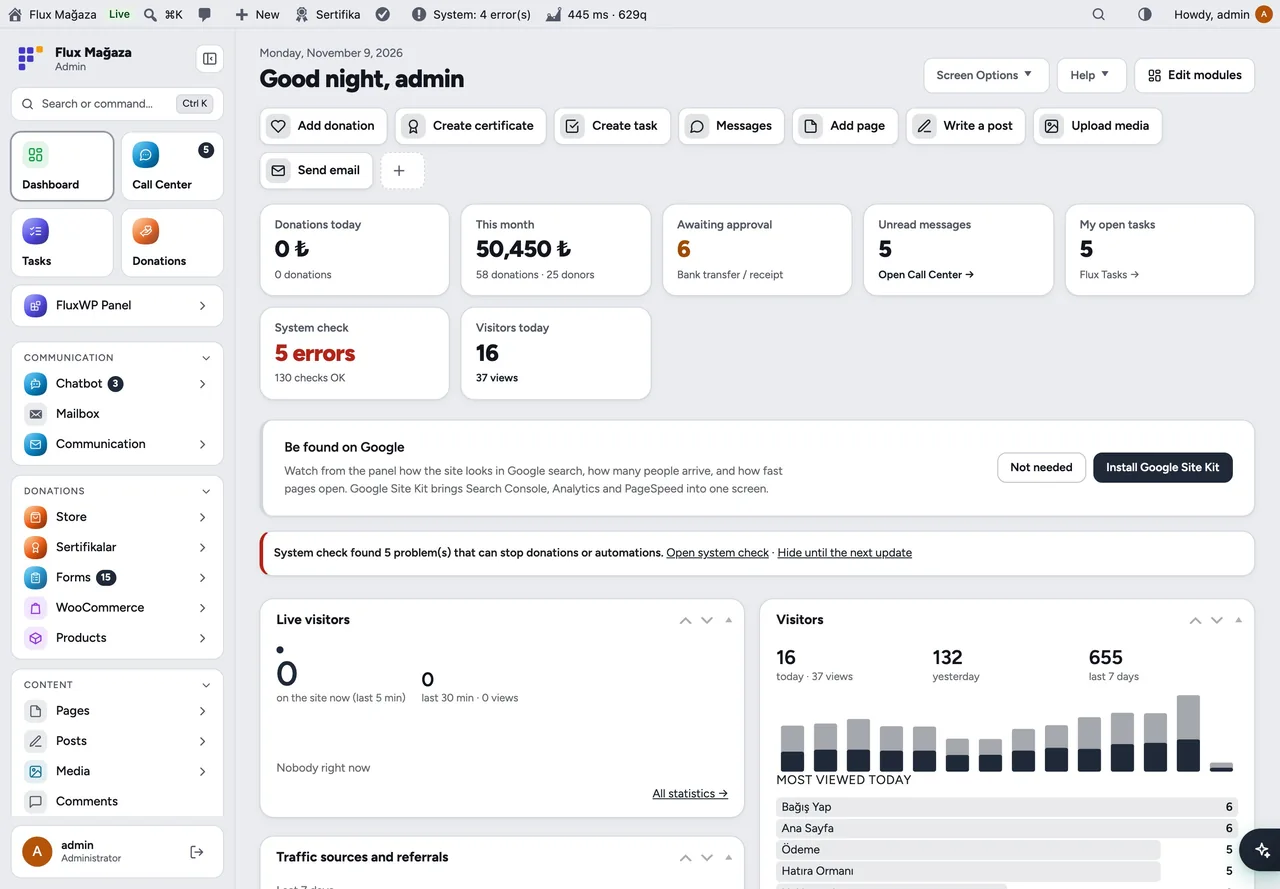
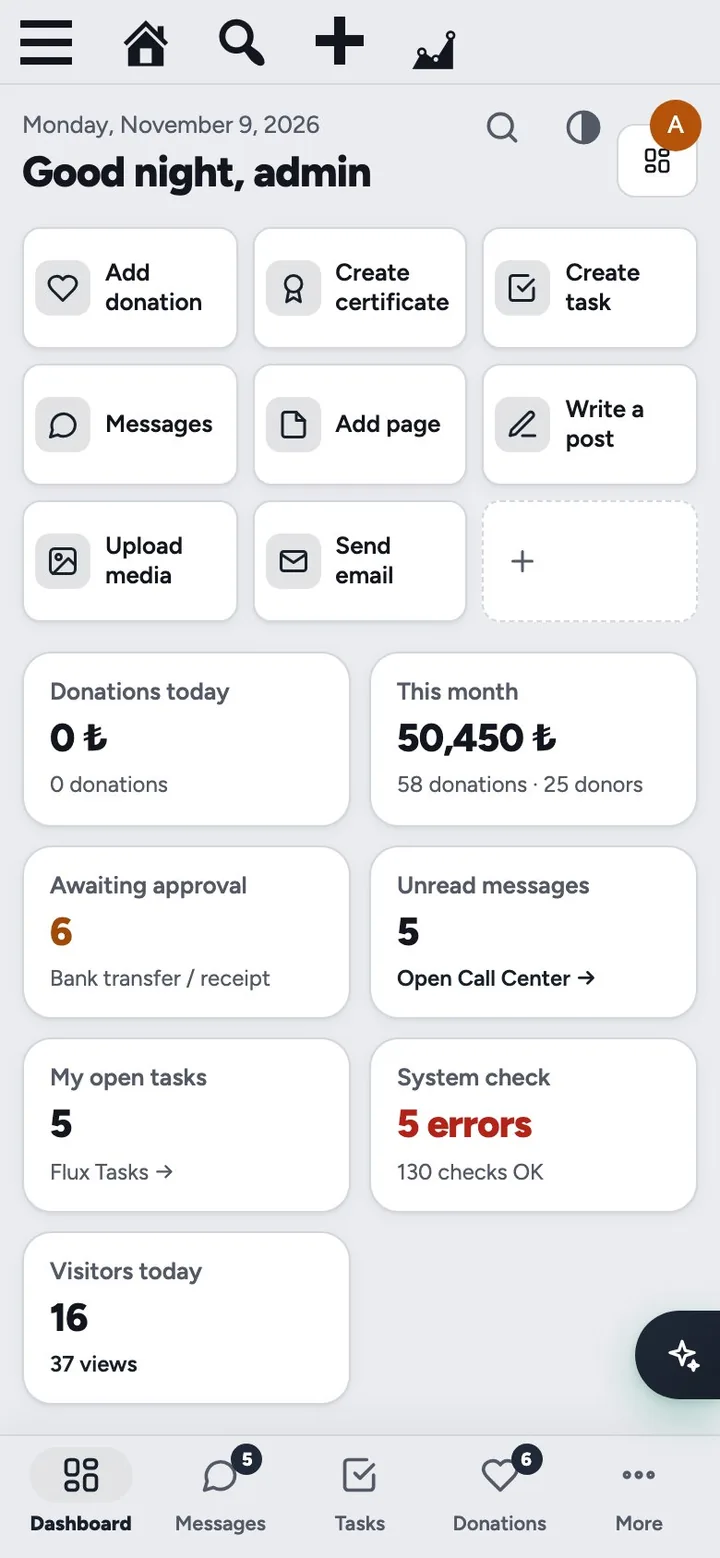
Flux Admin in action
The real plugin, real screens. A short tour.
Why Flux Admin?
Our volunteers and staff use WordPress mostly from their phones, and the stock admin shows them dozens of menus they never need. Flux Admin keeps WordPress underneath but changes how it feels:
-
Only what each role needs
Edit the sidebar per role: reorder, rename, hide, group. Hiding never changes permissions.
-
Phone first
A bottom bar with four shortcuts and a slide-in side panel; the bar hides while the keyboard is open.
-
Light, dark or automatic
, chosen by each person.
-
⌨️ Ctrl+K / ⌘K jumps to any screen, action or post.
-
No white flashes
The page is held until it is ready, so the menu and top bar never jump.
-
Install it as an app
on phones and computers (PWA) with a fast splash screen.
Flux Admin screenshots
Real screens from the demo site. Click to enlarge.
Flux Admin features
Modern WordPress admin theme with mobile bar
Navigation
- Grouped sidebar (General, Apps, Donations, Content, Site, Other) with line icons; collapses to an icon strip.
- Menu editor per role with a live preview: drag to reorder, rename, hide, add groups, copy from another role. With Flux App installed, each item can be shown on Web, Mobile or Desktop separately.
- Panel / WhatsApp / Tasks switch above the menu with unread badges, and a small switch on the edge of the Call Center and Tasks screens (Alt+1…9).
- Mobile bottom bar (four shortcuts you choose plus “More”) and a side panel that opens from the left.
Dashboard
- Editable modules: everyone can rearrange their own start screen with “Edit modules”.
- Summary tiles from other FluxWP packages (system check, visitors today, donations) and quick actions (
Label|address). - Live badges ride on WordPress Heartbeat, so no extra requests are opened.
Look and feel
- Automatic light and dark themes, brand name, subtitle, logo and accent colour.
- Command palette with search across menus, apps, actions and content.
- Shared building blocks for other packages: list filters and pagination (
flxa_list_*), safe-area variables for full-screen screens, modal dimming.
App (PWA)
- “Add to Home Screen” on phones and the install icon on desktop browsers. Only CSS, JS, fonts and images are cached, never admin pages.
- Logins made inside the app stay signed in; browser logins behave as usual.
Up and running in a few minutes
- Settings › Admin theme opens with sensible defaults; nothing has to be filled in.
- Under Menu and bottom bar, pick a role, arrange its menu and choose the four bottom-bar shortcuts, then Save.
- On a phone, open the admin and use Add to Home Screen to install it as an app.
Frequently asked questions
Didn't find your answer? Write to us. hello@fluxwp.com
Is Flux Admin free?
Yes. Flux Admin is free and open source (GPL-2.0-or-later). There is no licence key and nothing is locked; the source code is on GitHub.
How do I install Flux Admin?
Install Flux Setup, then press Install on the Flux Admin row under Flux Setup › Packages. Updates arrive in the standard WordPress Updates screen.
What does Flux Admin need?
WordPress 6.4 or later and PHP 7.4 or later. Shared hosting is enough.
Does Flux Admin work with other plugins?
Flux Admin works on its own. Installed with other FluxWP plugins it shares the same panel, roles, colours and AI settings, for example with Flux App, Flux Setup, and Flux Roles.
Is Flux Admin available in Turkish?
Yes. The interface follows the site language: English and Turkish are included, and other languages can be added with a translation file.
Works well with Flux Admin
One panel, one look, one settings screen. Add more as you need them.
-

Flux App
Admin & platformSign in from the desktop and mobile apps with OAuth, API keys and MCP for AI clients.
Details -
Flux Setup
Admin & platformSet up a whole site in one step: plugins, look and starter pages from a preset, with a guided wizard.
Details -
Flux Roles
Admin & platformStaff, manager and admin roles with per-module access you can change from the panel.
Details



Start with one plugin. Grow into the whole toolkit.
Install open source FluxWP on your own server for free, or let us host and set it up for you.