


Flux App
Sign-in and API layer for the FluxWP desktop and mobile app, and OAuth for AI assistants.
Flux App lets the FluxWP desktop and mobile app (and MCP clients such as Claude) sign in to the site with “Log in”: OAuth 2.0 with PKCE, personal API keys, and one-time codes for donors. It also tells the app what to show: a role-based menu, native screens registered by the other FluxWP plugins, counters and shortcuts, all managed from one Application page.
- Free and open source (GPL)
- WordPress 6.4+ · PHP 7.4+
- English & Turkish
- Admin & platform
Flux App in action
The real plugin, real screens. A short tour.
Why Flux App?
A phone or desktop app for a WordPress site usually means application passwords pasted by hand, or a separate backend. Flux App keeps WordPress the single source:
-
Real sign-in
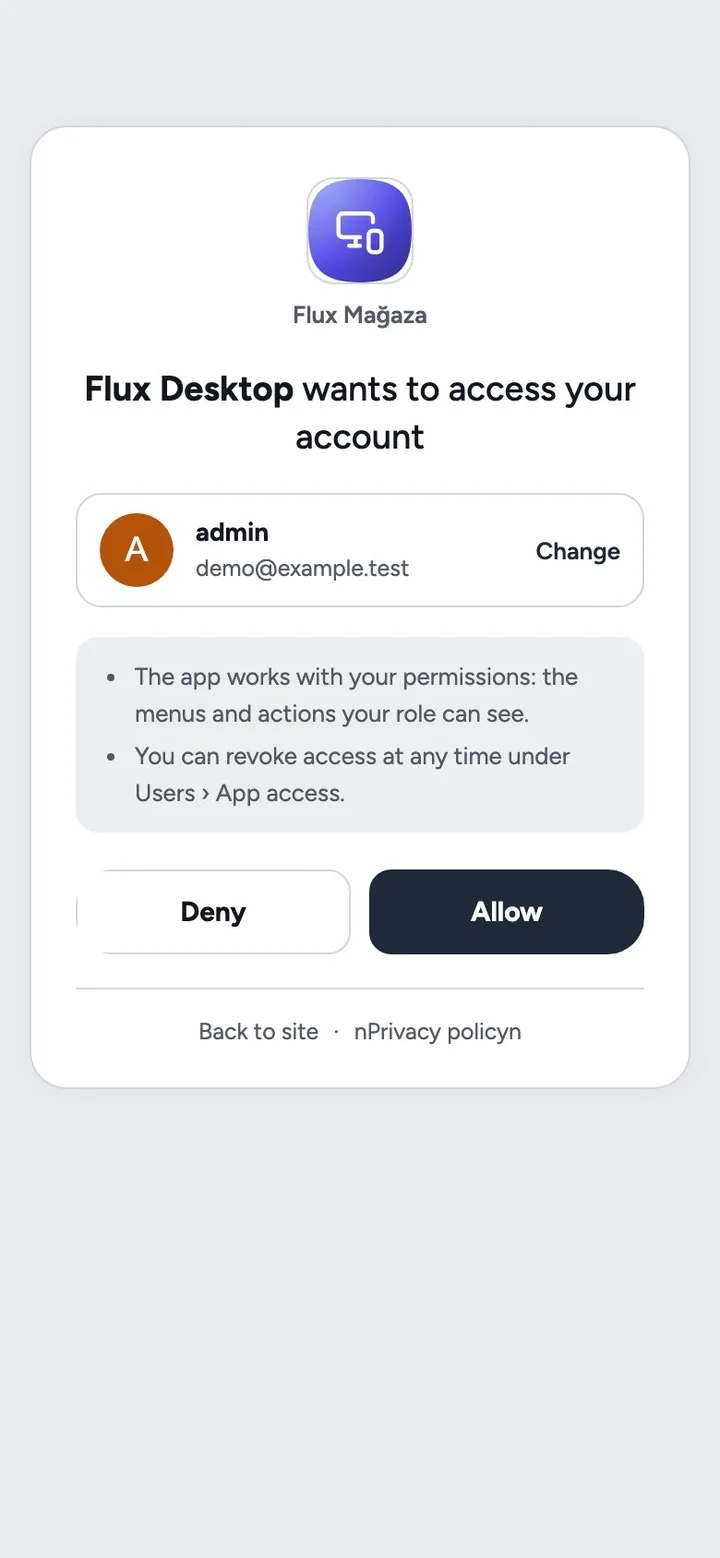
The app opens the site’s own login and a clear consent card; no passwords stored in the app, tokens can be revoked one by one.
-
The right menu for each person
The app receives the admin menu for the user’s role and platform, so staff, managers and donors each see their own.
-
Native where it matters
Plugins like Flux Chat, Flux Donate and Flux Studio register native screens; everything else opens as an embedded admin page without the admin chrome.
-
AI assistants included
MCP clients discover the OAuth server and register themselves, so Claude can connect to Flux SEO with “Log in” instead of a copied key.
Flux App screenshots
Real screens from the demo site. Click to enlarge.
Flux App features
WordPress desktop and mobile app login, API, MCP
Sign-in
- OAuth 2.0 authorisation code + PKCE (S256) with rotating refresh tokens and revoke; built-in client “Flux Desktop” (
flxmasaustu://and loopback redirects). - RFC 8414 / 9728 metadata and dynamic client registration for MCP clients; the Flux SEO endpoint accepts these tokens.
- Personal API keys (
Bearer flxak_…), with or without expiry. - Donor sign-in with a one-time code by WhatsApp (Flux Chat) or e-mail; a customer account is created for donors who have orders.
- One-time admin session from the app (
/session), andX-FluxWP-Tokenfallback for hosts that drop theAuthorizationheader.
What the app shows
/flxapp/v1/me: user, role-based admin menu, native modules, counters and the mobile bottom-bar shortcuts from Flux Admin.- Modules: native screens registered with
flxapp_modules, each one can be switched off. - Menu per platform: Flux Admin’s menu editor marks items for Web, Mobile and Desktop; the app sends
X-FluxWP-Platformand gets only its own. - Admin pages opened in the app hide the top bar, side menu and footer.
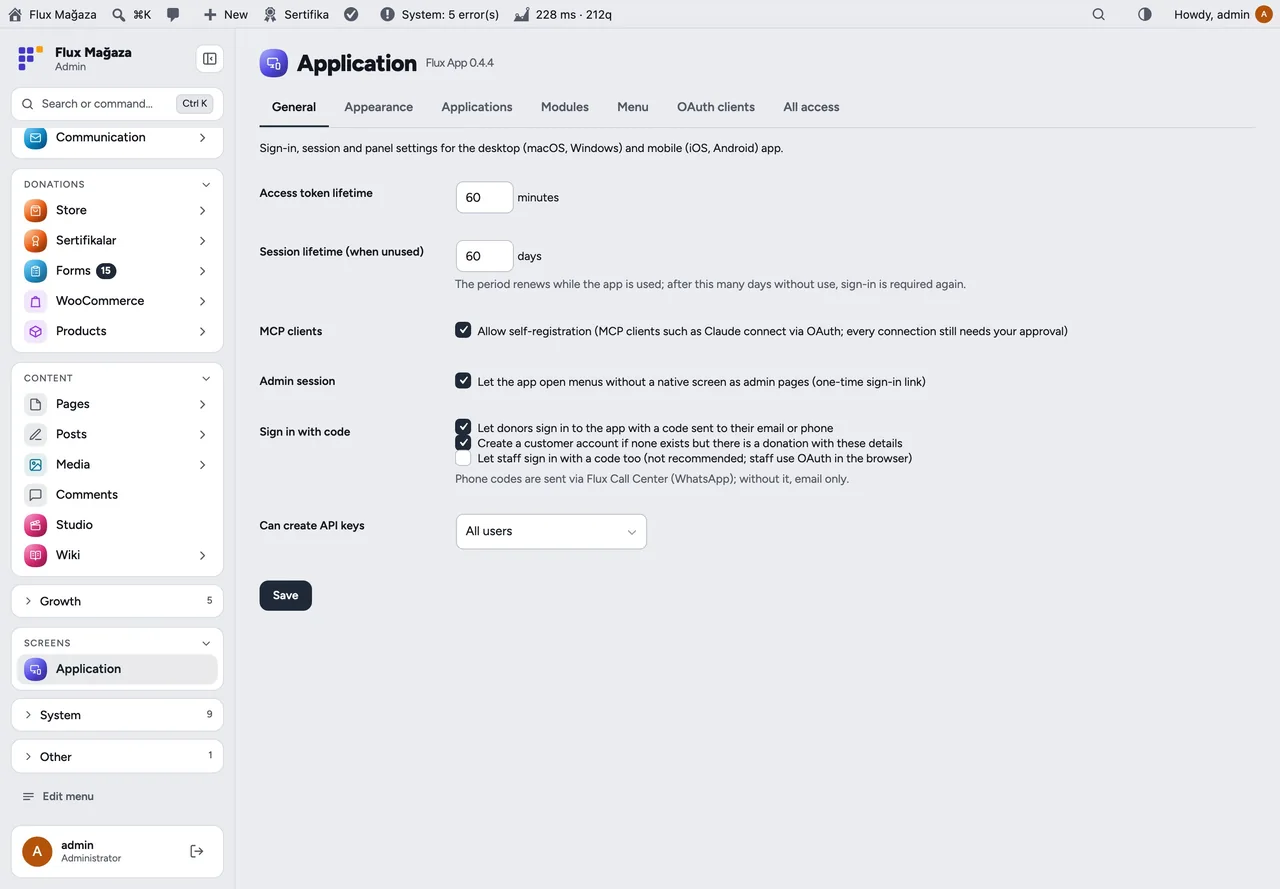
Application page
- Tabs: General, Modules, Menu, Connected apps, All access; people see and revoke their own sessions and keys under Users › App access.
Up and running in a few minutes
- Activate Flux App; Application appears in the admin menu. The defaults work: access 60 min, session 60 days, MCP self-registration on.
- In the app, enter the site address and press Log in: the site’s login and consent screen open, press Allow.
- For Claude and other MCP clients, give them
https://your-site/wp-json/flx-mcp/v1/mcpand sign in, or create an API key.
Requirements: The FluxWP desktop/mobile app or an MCP client. Optional: Flux Admin (menu per platform, bottom bar), Flux Chat (codes by WhatsApp), Flux Roles.
Frequently asked questions
Didn't find your answer? Write to us. hello@fluxwp.com
Is Flux App free?
Yes. Flux App is free and open source (GPL-2.0-or-later). There is no licence key and nothing is locked; the source code is on GitHub.
How do I install Flux App?
Install Flux Setup, then press Install on the Flux App row under Flux Setup › Packages. Updates arrive in the standard WordPress Updates screen.
What does Flux App need?
WordPress 6.4 or later and PHP 7.4 or later. Shared hosting is enough. The FluxWP desktop/mobile app or an MCP client. Optional: Flux Admin (menu per platform, bottom bar), Flux Chat (codes by WhatsApp), Flux Roles.
Does Flux App work with other plugins?
Flux App works on its own. Installed with other FluxWP plugins it shares the same panel, roles, colours and AI settings, for example with Flux Admin, Flux Roles, and Flux Chat.
Is Flux App available in Turkish?
Yes. The interface follows the site language: English and Turkish are included, and other languages can be added with a translation file.
Works well with Flux App
One panel, one look, one settings screen. Add more as you need them.
-

Flux Admin
Admin & platformA redesigned WordPress admin: role-based menu, mobile bottom bar and a command palette.
Details -
Flux Roles
Admin & platformStaff, manager and admin roles with per-module access you can change from the panel.
Details -
Flux Chat
CommunicationWhatsApp for WordPress and WooCommerce: a shared team inbox, quick replies, tags, assignment and AI suggestions.
Details



Start with one plugin. Grow into the whole toolkit.
Install open source FluxWP on your own server for free, or let us host and set it up for you.