


Flux SEO
Lightweight SEO for WordPress, plus an MCP server so Claude and other AI assistants can manage your content.
Flux SEO adds what a charity site needs to be found: meta titles and descriptions, canonical, Open Graph with sharp WhatsApp previews, schema (Organization, WebSite, Breadcrumb, Article), sitemap fixes, IndexNow, favicon and browser caching, with an SEO check for every page. It also runs an MCP server, so Claude Desktop, Claude Code, Cursor or claude.ai can list, write and fix content with a per-user key.
- Free and open source (GPL)
- WordPress 6.5+ · PHP 7.4+
- English & Turkish
- Content & growth
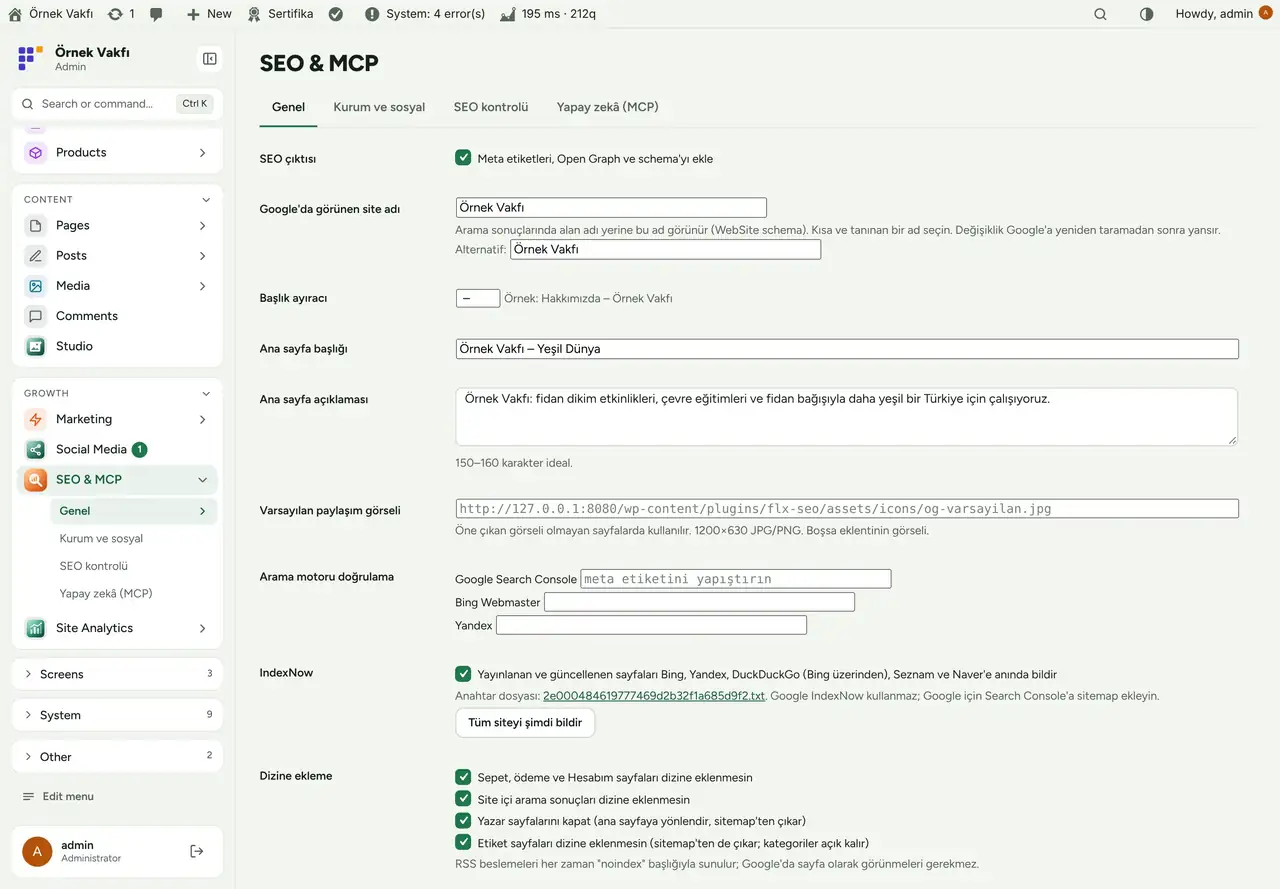
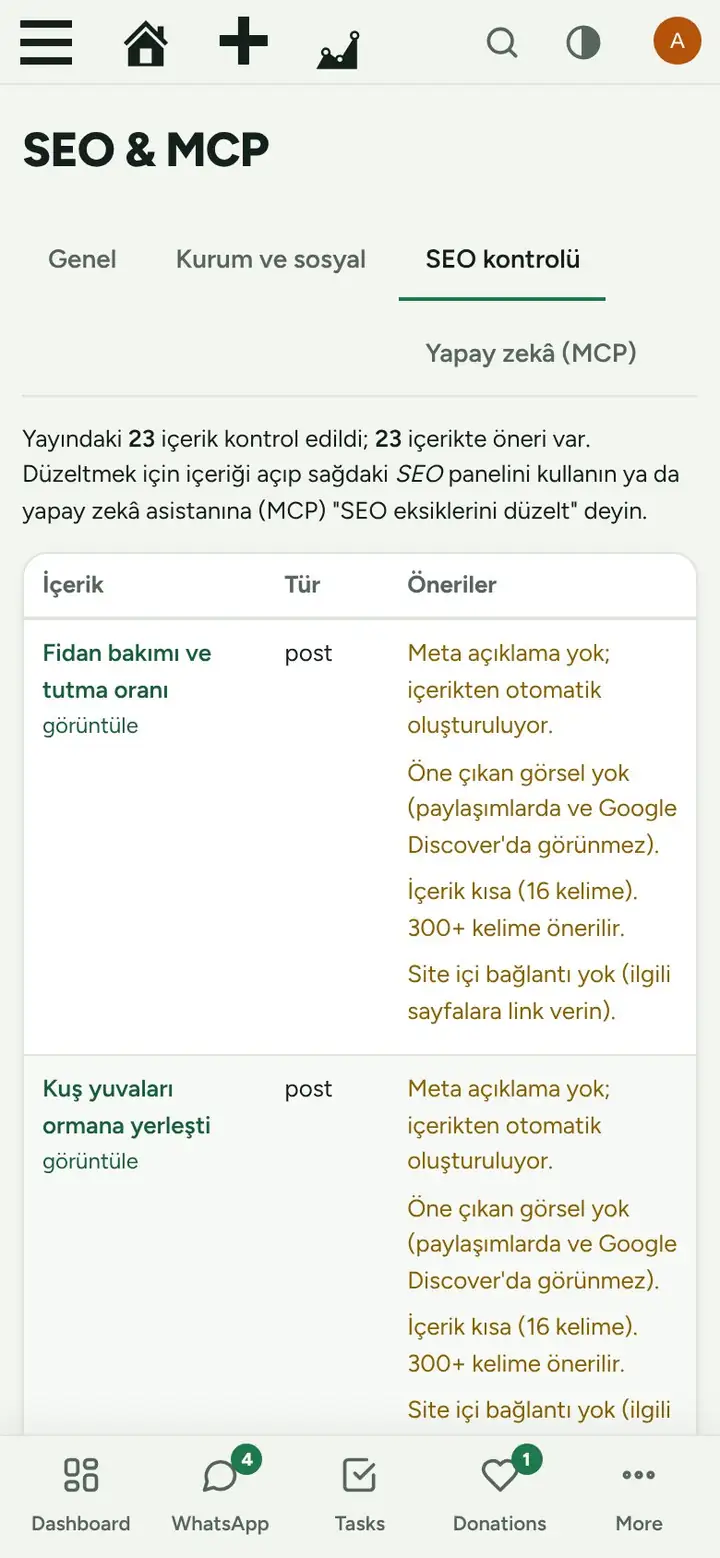
Flux SEO in action
The real plugin, real screens. A short tour.
Why Flux SEO?
Big SEO plugins bring dozens of screens, upsells and their own database tables; a small team only needs the basics done right and a way to keep them done. Flux SEO keeps it short:
-
The basics, correct
Titles, descriptions, canonical, Open Graph, schema and sitemap with sensible defaults, no setup wizard.
-
A list of what to fix
The SEO check reads every page and says what is missing: long titles, empty descriptions, no featured image, thin content, no internal links.
-
Let the assistant do it
Connect Claude (or any MCP client) with a key and say “fix the SEO gaps”: it reads the same list and fills the fields, with the permissions of the user who made the key.
-
Search engines told at once
IndexNow pings Bing, Yandex, Seznam and Naver when a page is published or updated.
Flux SEO screenshots
Real screens from the demo site. Click to enlarge.
Flux SEO features
WordPress SEO plugin with schema, sitemap, MCP
SEO
- Meta title and description per post, page and term, with a separator and home page title; automatic description from the content when empty.
- Editor panel: Google preview, character counters, focus keyword with checks (in title, description, content, H2, length, image alt), noindex toggle.
- Canonical, robots meta, Open Graph and Twitter cards;
og:imagesaved as a 1200×630 JPEG copy so WhatsApp previews stay sharp. - Schema: Organization or NGO (name, logo, address, contact, founding year, social profiles), WebSite with site name, BreadcrumbList, Article.
- Sitemap: noindex content, shop-only pages, authors and (optionally) tags removed;
lastmodadded;/sitemap.xmlredirects to/wp-sitemap.xml. - Noindex for cart/checkout/account, search results, author archives and tags; search engine verification for Google, Bing and Yandex.
- IndexNow with its key file served automatically and a “Notify the whole site” button.
- Favicon set from one image, automatic image alt text, browser caching rules for Apache and LiteSpeed.
- SEO check: every published page with its problems and suggestions.
MCP server
/wp-json/flx-mcp/v1/mcpwith per-user keys; keys can be limited to chosen tools; last use shown.- Tools: site info, list/get/create/update/delete content, set SEO, SEO audit, patterns, media upload and alt text, terms, site SEO settings; prompts for “fix SEO gaps”, “write a news post” and “build a page”.
- Other FluxWP plugins add their own tools through
flxseo_mcp_tools(orders, system checks and fixes are already there). - New content is created as a draft; delete only moves to trash. Every call is logged.
Up and running in a few minutes
- Activate Flux SEO and open SEO & MCP › General: check the site name, home title and description.
- Fill Organisation and social so Google can show your knowledge panel.
- Open SEO check and work through the list, by hand or with the assistant.
Requirements: An MCP client (Claude Desktop, Claude Code, Cursor, claude.ai) if you want AI access.
Frequently asked questions
Didn't find your answer? Write to us. hello@fluxwp.com
Is Flux SEO free?
Yes. Flux SEO is free and open source (GPL-2.0-or-later). There is no licence key and nothing is locked; the source code is on GitHub.
How do I install Flux SEO?
Install Flux Setup, then press Install on the Flux SEO row under Flux Setup › Packages. Updates arrive in the standard WordPress Updates screen.
What does Flux SEO need?
WordPress 6.5 or later and PHP 7.4 or later. Shared hosting is enough. An MCP client (Claude Desktop, Claude Code, Cursor, claude.ai) if you want AI access.
Does Flux SEO work with other plugins?
Flux SEO works on its own. Installed with other FluxWP plugins it shares the same panel, roles, colours and AI settings, for example with Flux Analytics, Flux Lang, and Flux Studio.
Is Flux SEO available in Turkish?
Yes. The interface follows the site language: English and Turkish are included, and other languages can be added with a translation file.
Works well with Flux SEO
One panel, one look, one settings screen. Add more as you need them.
-

Flux Analytics
Content & growthCookie-free analytics, a privacy-friendly Google Analytics alternative: visitors, top pages, referrers, devices and campaigns.
Details -
Flux Lang
Content & growthMultilingual WordPress: translate your site with /en/ style URLs, per-page translations, hreflang and canonical.
Details -
Flux Studio
Content & growthAn AI image and video studio with references, area editing and a folder gallery.
Details



Start with one plugin. Grow into the whole toolkit.
Install open source FluxWP on your own server for free, or let us host and set it up for you.