


Flux Backup
A backup before every update, and a clear way back when something breaks.
Flux Backup takes an automatic backup of the database and the package before every plugin or theme update, runs scheduled full backups, keeps them inside a quota you set and lets you restore just the parts you need. Built for shared hosting: no exec, no mysqldump, small steps that survive timeouts.
- Free and open source (GPL)
- WordPress 6.4+ · PHP 7.4+
- English & Turkish
- Care & infrastructure
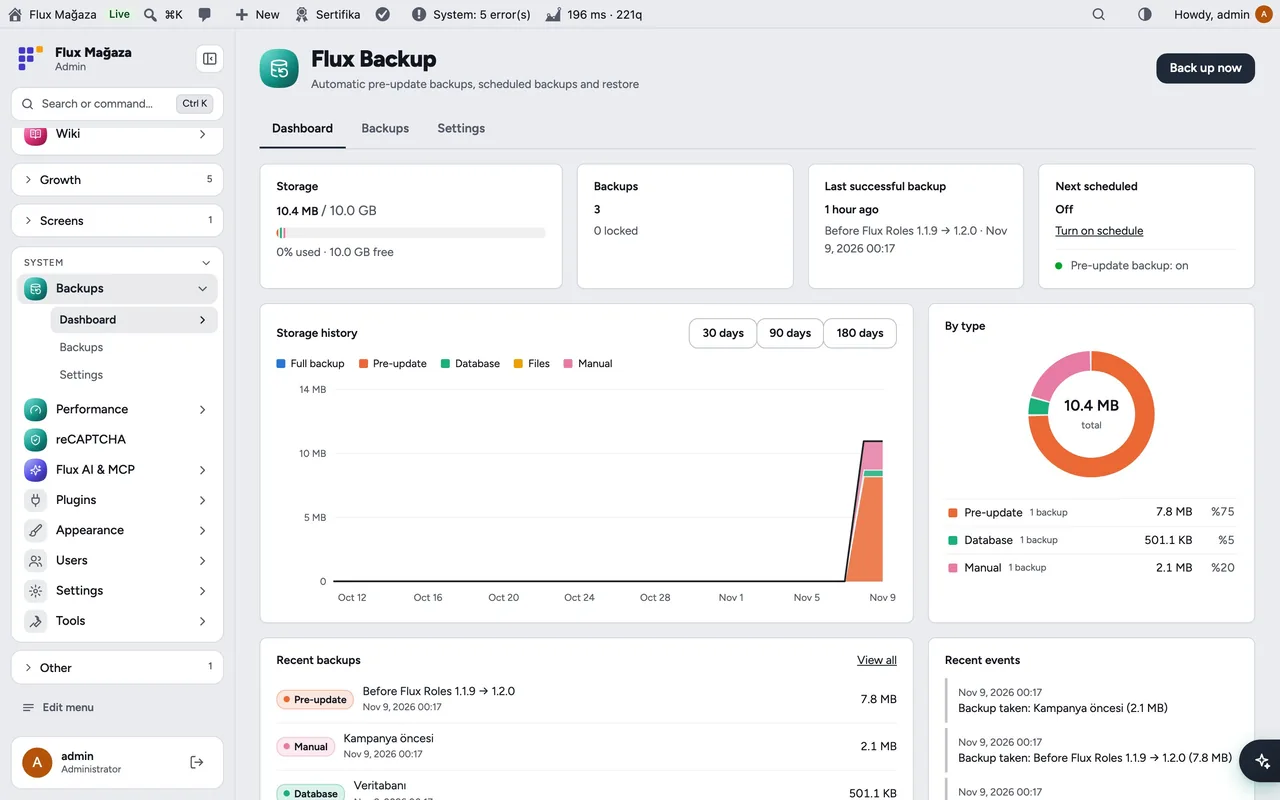

Flux Backup in action
The real plugin, real screens. A short tour.
Why Flux Backup?
Hosting backups are daily at best, and restoring one rolls back everything, including today’s donations. The risky moment is an update, so Flux Backup protects exactly that moment:
-
Automatic pre-update backups
of the database and the updated package, for manual, bulk and automatic updates.
-
Scheduled full backups
, daily or weekly at night.
-
Selective restore
the database, a single plugin or theme folder, or both.
-
You always know the cost
quota bar, storage history and space per type.
-
Lock
important backups so quota and retention never delete them.
-
Shared-hosting friendly
~20-second steps continued by WP-Cron; nothing to install on the server.
Flux Backup screenshots
Real screens from the demo site. Click to enlarge.
Flux Backup features
WordPress backup plugin with backup before updates
Dashboard
- Storage against quota, number of backups and locked ones, last successful backup and the next scheduled one.
- Storage history chart (30/90/180 days) by type, a breakdown by type and recent backups and events.
Backups
- List with filters by type (full, pre-update, database, files, manual), download, restore, lock, delete and bulk delete.
- Backup details: size breakdown (database, plugins, themes, uploads, other), original and archived size, WordPress version and retention.
- Upload a backup archive and restore from it.
Settings
- Quota (default 10 GB); when it fills up the oldest unlocked backup goes first.
- Pre-update scope: all packages, only FluxWP packages, or off; retention in days.
- Scheduled full backup: frequency, time and how many to keep; optionally WordPress core files too.
- Excluded paths (caches, large media folders…).
Storage
- Backups are stored in
wp-content/wp-snapshots/flx-backup/, closed to the web, with random file names; downloads are admin-only.
Up and running in a few minutes
- Backups › Settings: set the quota, the pre-update scope and, if you like, a scheduled full backup.
- Dashboard › Back up now for the first full backup.
- From now on every plugin and theme update is preceded by a backup that is kept for 7 days.
Requirements: The PHP zip extension.
Frequently asked questions
Didn't find your answer? Write to us. hello@fluxwp.com
Is Flux Backup free?
Yes. Flux Backup is free and open source (GPL-2.0-or-later). There is no licence key and nothing is locked; the source code is on GitHub.
How do I install Flux Backup?
Install Flux Setup, then press Install on the Flux Backup row under Flux Setup › Packages. Updates arrive in the standard WordPress Updates screen.
What does Flux Backup need?
WordPress 6.4 or later and PHP 7.4 or later. Shared hosting is enough. The PHP zip extension.
Does Flux Backup work with other plugins?
Flux Backup works on its own. Installed with other FluxWP plugins it shares the same panel, roles, colours and AI settings, for example with Flux Speed, Flux Setup, and Flux Admin.
Is Flux Backup available in Turkish?
Yes. The interface follows the site language: English and Turkish are included, and other languages can be added with a translation file.
Works well with Flux Backup
One panel, one look, one settings screen. Add more as you need them.
-

Flux Speed
Care & infrastructureSpeed optimization starts with knowing what is slow: slow requests, queries, PHP errors and server load.
Details -
Flux Setup
Admin & platformSet up a whole site in one step: plugins, look and starter pages from a preset, with a guided wizard.
Details -
Flux Admin
Admin & platformA redesigned WordPress admin: role-based menu, mobile bottom bar and a command palette.
Details



Start with one plugin. Grow into the whole toolkit.
Install open source FluxWP on your own server for free, or let us host and set it up for you.