


Flux Speed
Find out why your WordPress site is slow, even on shared hosting.
A developer panel for every request (queries, PHP errors, HTTP calls, hooks), a log of slow and failing requests, live server health, database, autoload and cron views, and the shared System Check for all FluxWP packages. AI assistants can read all of it over MCP.
- Free and open source (GPL)
- WordPress 6.4+ · PHP 7.4+
- English & Turkish
- Care & infrastructure
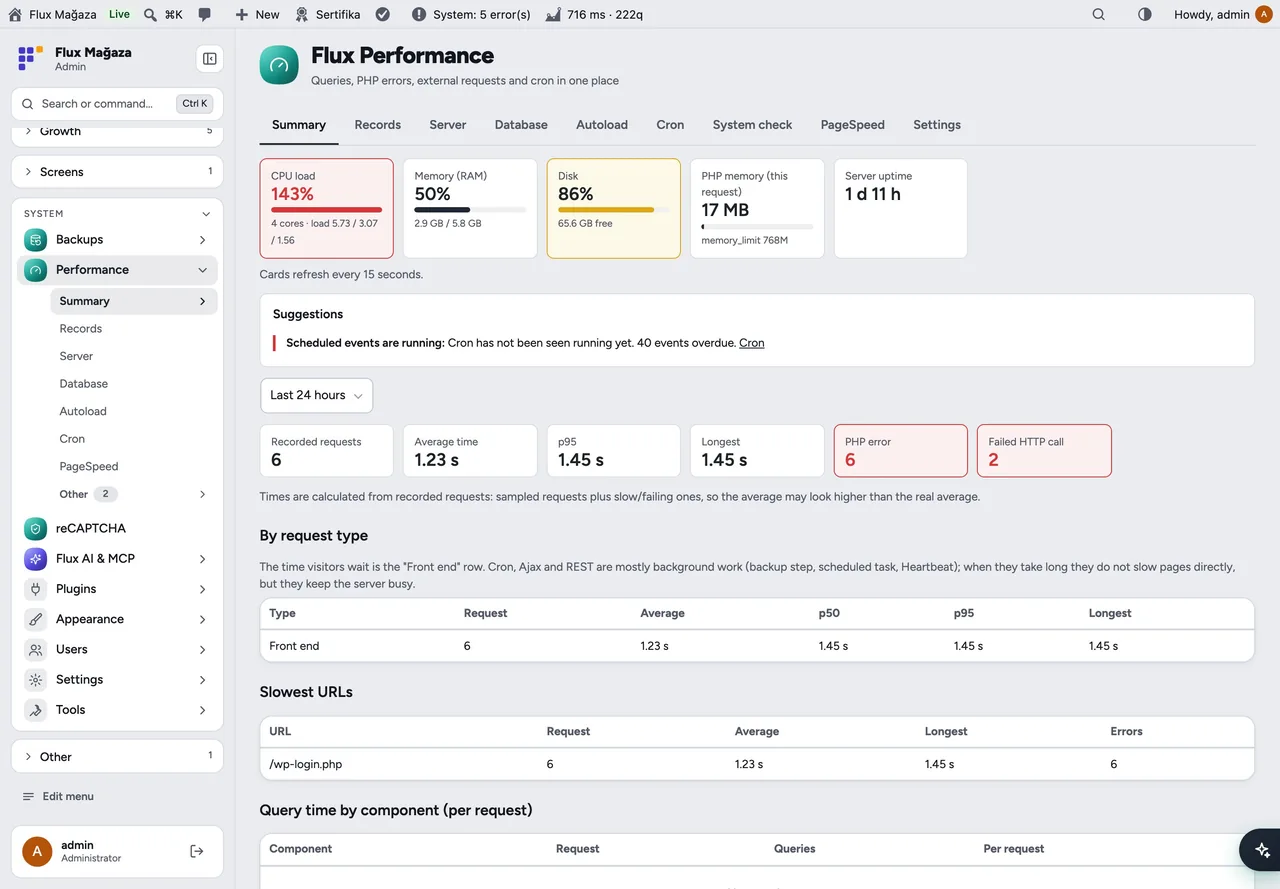

Flux Speed in action
The real plugin, real screens. A short tour.
Why Flux Speed?
Query Monitor tells you what happened on the page you are looking at; it forgets everything else. On shared hosting the slow request is usually the one nobody was watching. Flux Speed keeps the useful part of both worlds:
-
It records
Slow and failing requests are saved with their queries, errors and HTTP calls, so you can look at them later.
-
A full developer panel
in the admin bar for logged-in staff:
266 ms · 49q · ⚠ 1, one click away. -
Server health at a glance
CPU load, RAM, disk, PHP memory and uptime, refreshed live, with suggestions.
-
Safe clean-ups
expired transients, old auto-drafts, spam and trash comments, table optimisation.
-
One System Check
that every FluxWP package reports into.
-
AI ready
“why was the site slow yesterday?” works in Flux AI and any MCP client.
Flux Speed screenshots
Real screens from the demo site. Click to enlarge.
Flux Speed features
WordPress speed and performance monitoring
Developer panel
- Admin-bar summary (time, queries, warnings) and a resizable bottom panel: queries (duplicates, by component, slow), PHP errors, HTTP API calls, logs, template, request, hooks, timeline and capability checks.
- Profile page: open any address of this site like a visitor (no cache) and record it in full.
Records and overview
- Request log with filters (time, flag, type, address) and “slowest first”; click a row to see its full panel.
- Overview: p95, average and longest time, slowest addresses, query time by plugin, grouped slow queries, PHP errors and failing outgoing requests for the last hour, day or week.
- Suggestions such as “autoload is large”, “cron is not running”, “disk is almost full”, “OPcache is off”.
Server and site
- Server: OS, web server, PHP limits and disabled functions, extensions, OPcache, caches, WordPress constants and active plugins. Read from
/procand PHP, noshell_execand no external services. - Database: version, key settings, status, table sizes and a clean-up section (admin only, with confirmation).
- Autoload: total size and the 40 largest options with their owner. Cron: every scheduled event, overdue ones and when cron last ran.
- System Check: checks and one-click fixes from every FluxWP package (
flx_system_checks,flx_system_fixes). - Dashboard widget with live boxes, p95, failing and slow requests and the top suggestions.
Light on shared hosting
- Visitors only trigger cheap hooks (errors, HTTP calls, timing). Query capture runs only on sampled requests, for logged-in staff and when profiling a page.
- One INSERT at the end of a request; old rows are pruned on the fly. Emails, phone numbers, IBANs, tokens and secrets are masked before anything is stored.
Up and running in a few minutes
- Activate it; the
wp_flxp_requeststable is created automatically. - Performance › Settings comes with values that suit shared hosting (2 % sampling, 1500 ms slow request, 100 ms slow query, 7 days).
- Give staff the flxp_view capability in Flux Roles if they should see it. Administrators have it already.
Frequently asked questions
Didn't find your answer? Write to us. hello@fluxwp.com
Is Flux Speed free?
Yes. Flux Speed is free and open source (GPL-2.0-or-later). There is no licence key and nothing is locked; the source code is on GitHub.
How do I install Flux Speed?
Install Flux Setup, then press Install on the Flux Speed row under Flux Setup › Packages. Updates arrive in the standard WordPress Updates screen.
What does Flux Speed need?
WordPress 6.4 or later and PHP 7.4 or later. Shared hosting is enough.
Does Flux Speed work with other plugins?
Flux Speed works on its own. Installed with other FluxWP plugins it shares the same panel, roles, colours and AI settings, for example with Flux AI, Flux Backup, and Flux Setup.
Is Flux Speed available in Turkish?
Yes. The interface follows the site language: English and Turkish are included, and other languages can be added with a translation file.
Works well with Flux Speed
One panel, one look, one settings screen. Add more as you need them.
-

Flux AI
Admin & platformAI for WordPress in one hub: OpenRouter and Anthropic keys, model catalog, budgets and prompt cache for every plugin.
Details -
Flux Backup
Care & infrastructureAutomatic backup before every update, scheduled full backups, quotas and retention.
Details -
Flux Setup
Admin & platformSet up a whole site in one step: plugins, look and starter pages from a preset, with a guided wizard.
Details



Start with one plugin. Grow into the whole toolkit.
Install open source FluxWP on your own server for free, or let us host and set it up for you.