


Flux Mail
Every e-mail the site sends, its mailbox, and its WhatsApp and SMS lines in one place.
Flux Mail replaces “WordPress <wordpress@…>” with your organisation: a sender name and address, SMTP, a branded mobile-friendly template for every WordPress, WooCommerce and FluxWP e-mail, a log of everything sent, single and bulk sending, and a mailbox for bilgi@ with AI replies. WhatsApp (Evolution API, Flux WPAPI, Cloud API) and SMS (Netgsm) connections live here too, and other plugins send through them.
- Free and open source (GPL)
- WordPress 6.2+ · PHP 7.4+
- English & Turkish
- Communication
Flux Mail in action
The real plugin, real screens. A short tour.
Why Flux Mail?
Out of the box, WordPress sends plain text from wordpress@your-host, every plugin has its own look, nothing is logged, and replies go nowhere. A charity notices this the day a donor says “your certificate went to spam”. Flux Mail fixes the whole path:
-
One sender, one look
bilgi@ for e-mails that expect a reply, no-reply@ for passwords and notices, one branded template for WordPress, WooCommerce and every FluxWP package.
-
Every e-mail in a list
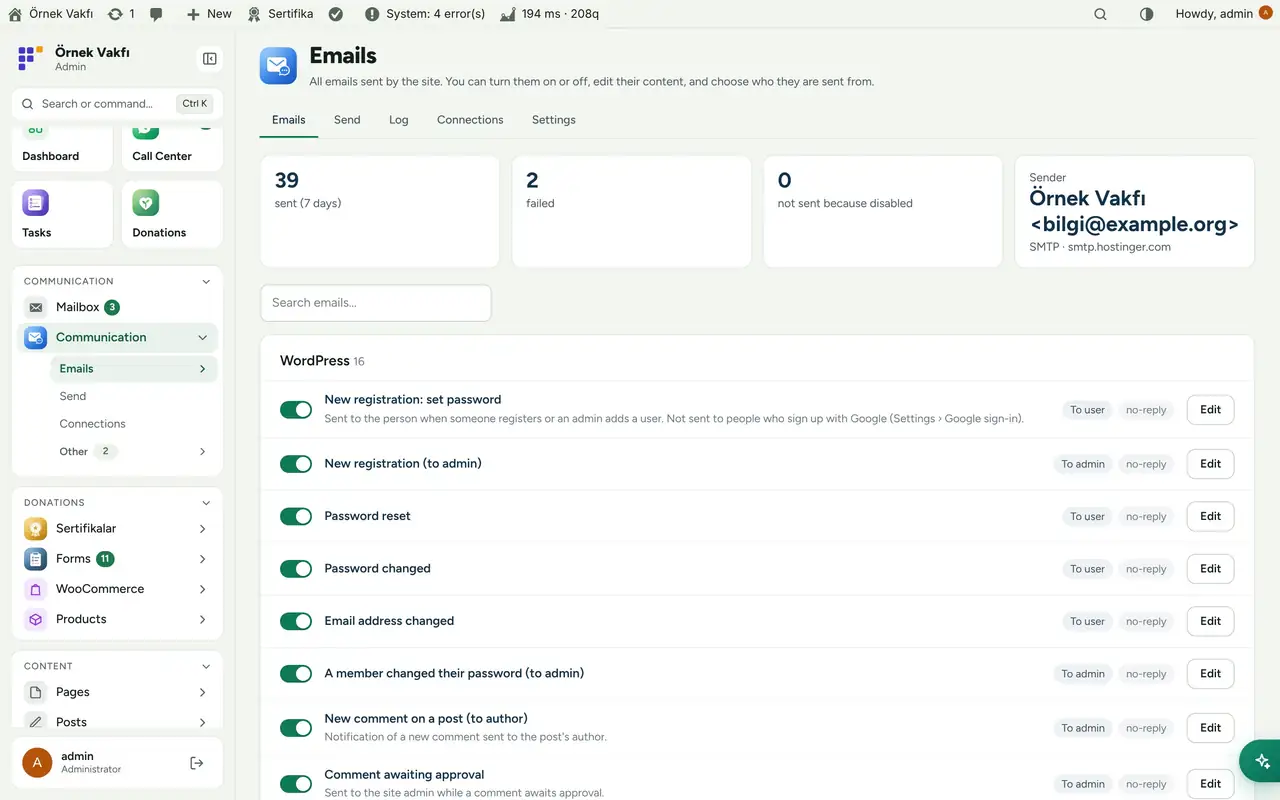
Turn any of them on or off, edit the subject, heading, text and button, preview on desktop, phone and dark mode, send yourself a test.
-
A real mailbox
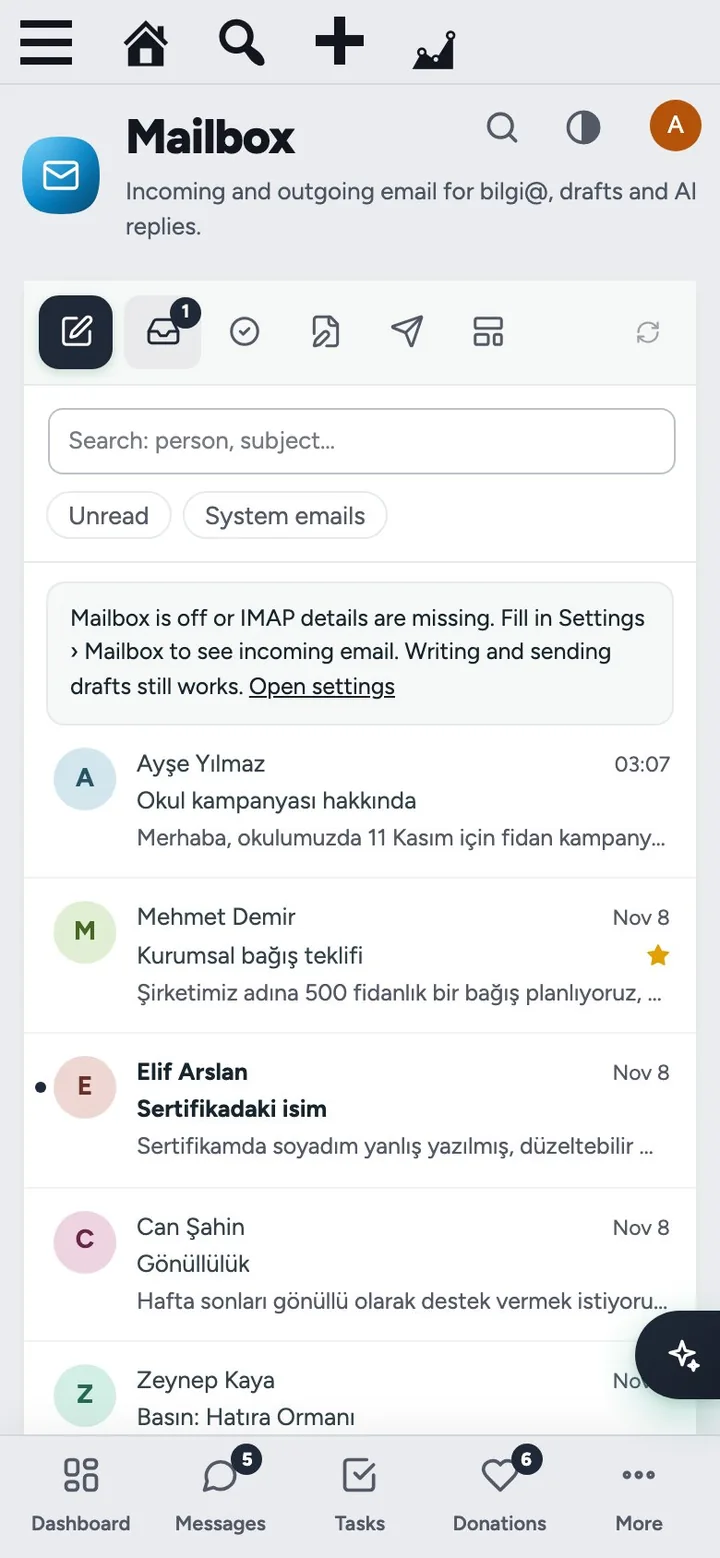
bilgi@ inside the admin over IMAP: read, reply, forward, drafts, approval for AI-written replies.
-
WhatsApp and SMS for everyone
Connect numbers once; Flux Certificates, Flux Chat and the rest use them through one API.
-
Proof
Every e-mail, WhatsApp and SMS message is logged with its content, status and error.
Flux Mail screenshots
Real screens from the demo site. Click to enlarge.
Flux Mail features
WordPress SMTP, email templates and mailbox
- Sender: organisation name, bilgi@ and no-reply@ addresses, reply-to; other plugins’ sender is changed too (for SPF/DKIM).
- Sending method: SMTP with a “Fill in Hostinger settings” button, a separate no-reply@ account, passwords stored encrypted or in
wp-config.php; falls back to bilgi@ if no-reply@ fails. - E-mails: every e-mail of WordPress, WooCommerce and FluxWP packages, grouped, with on/off, editor, sender choice, desktop/phone/dark preview and “Send me a test”. Unknown e-mails join the list the first time they are sent.
- Appearance: logo for light and dark backgrounds, colours, tagline, address, social links, a silhouette image footer; images (WebP too) are embedded so every mail program shows them; “Apply appearance to WooCommerce”; PDF download of any preview.
- DNS check for SPF, DKIM and DMARC; Google sign-up users don’t get “set your password” mails.
Mailbox, sending and log
- Mailbox: bilgi@ over IMAP with unread and system-mail filters, starred, attachments, reply/reply all/forward, drafts, layouts and Write reply with AI (lands in Awaiting approval).
- Send: e-mail, WhatsApp or SMS to one person or a list (members by role, Flux Certificates contacts), live preview, background queue that respects your host’s daily and per-message limits.
- Log: every message with time, recipient, subject, source plugin, channel and status; click for the content. Block list from Flux Chat is honoured.
WhatsApp and SMS
- Connections: WhatsApp via Evolution API, Flux WPAPI or Cloud API (Meta), SMS via Netgsm; several numbers, a default per channel, QR or pairing-code connect, status, restart, log out.
- Test a connection with text, image, voice message, document or (Cloud API) a template.
Up and running in a few minutes
- Activate Flux Mail: WordPress e-mails switch to bilgi@ / no-reply@ and the branded template right away.
- Communication › Settings › Sending method › SMTP › Fill in Hostinger settings, enter the password, save and Send test email.
- Settings › Test › Check DNS and add any missing SPF, DKIM or DMARC record.
- Settings › Mailbox: turn on the mailbox for bilgi@ (IMAP fills in from SMTP).
- Communication › Connections: add a WhatsApp number (QR) and Netgsm for SMS.
Requirements: An e-mail account for bilgi@ (and optionally no-reply@). Optional: an Evolution API 2.3+ or Flux WPAPI server for WhatsApp, a Netgsm account for SMS, Flux AI for AI replies, Flux Chat for the block list.
Frequently asked questions
Didn't find your answer? Write to us. hello@fluxwp.com
Is Flux Mail free?
Yes. Flux Mail is free and open source (GPL-2.0-or-later). There is no licence key and nothing is locked; the source code is on GitHub.
How do I install Flux Mail?
Install Flux Setup, then press Install on the Flux Mail row under Flux Setup › Packages. Updates arrive in the standard WordPress Updates screen.
What does Flux Mail need?
WordPress 6.2 or later and PHP 7.4 or later. Shared hosting is enough. An e-mail account for bilgi@ (and optionally no-reply@). Optional: an Evolution API 2.3+ or Flux WPAPI server for WhatsApp, a Netgsm account for SMS, Flux AI for AI replies, Flux Chat for the block list.
Does Flux Mail work with other plugins?
Flux Mail works on its own. Installed with other FluxWP plugins it shares the same panel, roles, colours and AI settings, for example with Flux AI, Flux Chat, and Flux Certificates.
Is Flux Mail available in Turkish?
Yes. The interface follows the site language: English and Turkish are included, and other languages can be added with a translation file.
Works well with Flux Mail
One panel, one look, one settings screen. Add more as you need them.
-

Flux AI
Admin & platformAI for WordPress in one hub: OpenRouter and Anthropic keys, model catalog, budgets and prompt cache for every plugin.
Details -
Flux Chat
CommunicationWhatsApp for WordPress and WooCommerce: a shared team inbox, quick replies, tags, assignment and AI suggestions.
Details -
Flux Certificates
Commerce & givingCertificate templates with live PDF preview, a verification page and delivery by email, SMS or WhatsApp.
Details



Start with one plugin. Grow into the whole toolkit.
Install open source FluxWP on your own server for free, or let us host and set it up for you.