


Flux Forms
Drag-and-drop forms that look like your site, with payments and automations built in.
Flux Forms is our fork of Easy Form Builder with every feature unlocked and nothing phoning home. Build contact, survey, support and donation forms with 50+ field types, take payments, follow responses on a dashboard and let automations create and send a certificate when a donation is paid.
- Free and open source (GPL)
- WordPress 6.4+ · PHP 7.4+
- English & Turkish
- Communication

Flux Forms in action
The real plugin, real screens. A short tour.
Why Flux Forms?
Form plugins usually lock the useful parts (payments, conditional logic, file uploads) behind a licence and call home to check it. We needed one that is fully ours, runs on shared hosting and works with our donation and certificate packages. Flux Forms is that:
-
Everything unlocked
No licence checks, remote add-on downloads or telemetry; Stripe, conditional logic and offline country/city lists rewritten.
-
Looks like the site
Forms use the theme’s colours, fonts and dark mode automatically; the builder shows the form exactly as it will appear.
-
Know what works
Responses, form views, conversion rate and payments per form, compared with the previous period.
-
Donation to certificate, automatically
A paid donation creates a certificate (Flux Certificates), sends it by WhatsApp and e-mail and shows it on the thank-you screen.
-
Hardened
stored XSS, tracking-code IDOR, upload folder and IP detection fixes on top of the original.
Flux Forms screenshots
Real screens from the demo site. Click to enlarge.
Flux Forms features
WordPress form builder with payments
Builder
- 50+ elements: text, name, e-mail, phone with country picker, number, date, file and drag-and-drop upload, address and country/province/district lists, map location picker (OpenStreetMap), signature, rating, NPS, image picker, terms (KVKK), payment options, price and total fields, audio/video/screen recording and more.
- Element panel with search and categories, settings panel that opens when you click a field, multi-step forms with a custom last-step title.
- Conditional logic: show/hide fields or steps, make required, disable, block submission; rules are enforced on the server too.
- Ready templates: Contact, Support, Survey, Payment, Donation, multi-step contact, customer feedback, login and registration.
Responses
- Panel with every form and its shortcode
[EMS_Form_Builder id=3]; Elementor and WPBakery widgets. - Response list with unread markers, a detail view with payment info and totals, tracking codes, replies and CSV export.
- E-mails go through Flux Mail‘s shared design when it is active (editable templates under Contact › E-mails).
Dashboard
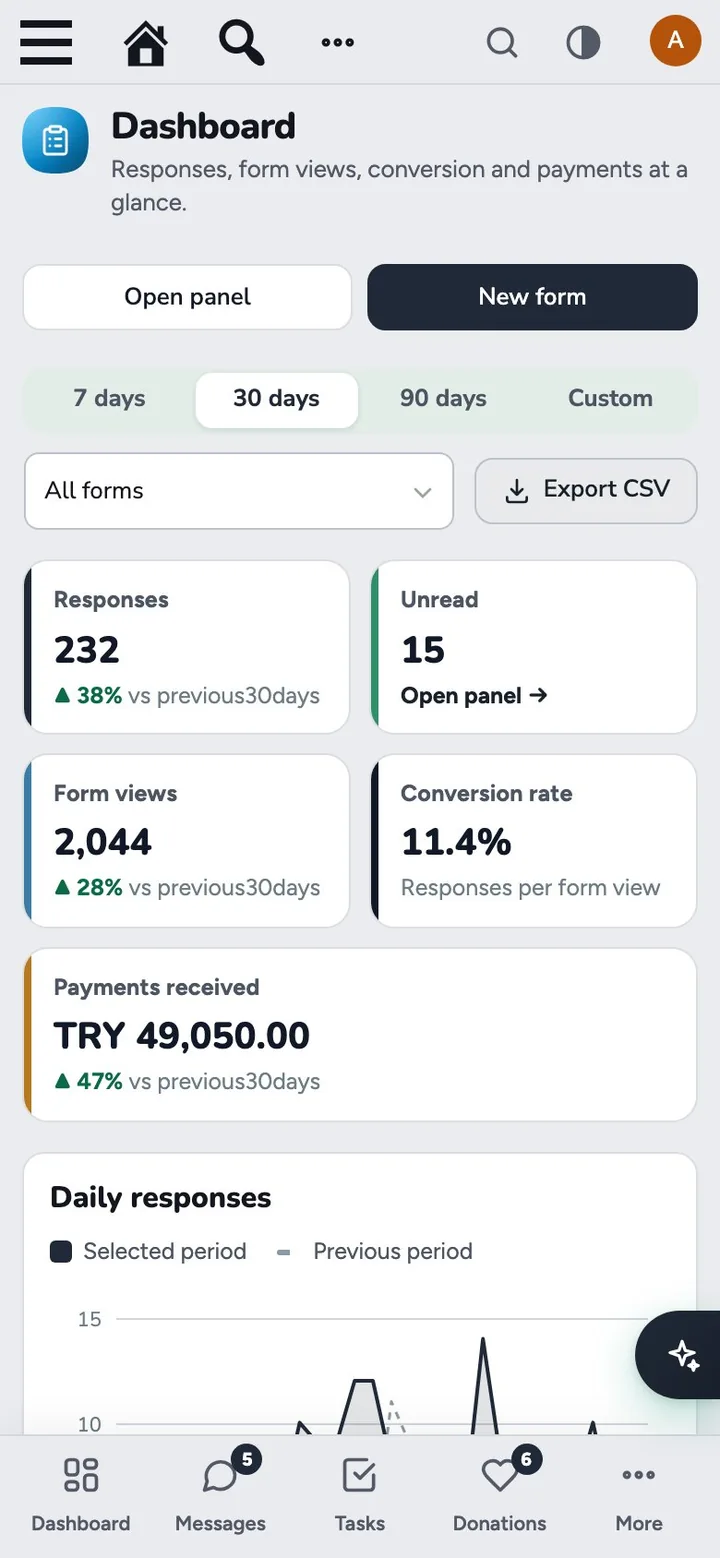
- Responses, unread, form views, conversion rate and payments received, each compared with the previous period.
- Daily responses chart, payment status, responses per form, a day-and-hour heat map and the latest responses; filter by form and period, CSV export.
Payments and automations
- With Flux Donate, the Pay step puts the chosen amount into the WooCommerce checkout (card, bank transfer, monthly donation); without it, built-in Stripe with server-side amount checks and webhooks.
- Automations: when a form is submitted or a payment completes, run steps such as Create certificate, Send certificate, Show on thank-you screen, Send e-mail and Webhook. A ready-made “Donation → Certificate” flow is one click away.
Up and running in a few minutes
- If the original Easy Form Builder is installed, deactivate it (don’t delete it) before activating Flux Forms: both use the same tables, so your forms and responses come over as they are.
- Forms › Create: pick a template, adjust it and Save.
- Copy the shortcode from Forms › Panel into a page with a Shortcode block.
- For donations: Forms › Automations › Create default flow connects the donation form to Flux Certificates.
Frequently asked questions
Didn't find your answer? Write to us. hello@fluxwp.com
Is Flux Forms free?
Yes. Flux Forms is free and open source (GPL-2.0-or-later). There is no licence key and nothing is locked; the source code is on GitHub.
How do I install Flux Forms?
Install Flux Setup, then press Install on the Flux Forms row under Flux Setup › Packages. Updates arrive in the standard WordPress Updates screen.
What does Flux Forms need?
WordPress 6.4 or later and PHP 7.4 or later. Shared hosting is enough.
Does Flux Forms work with other plugins?
Flux Forms works on its own. Installed with other FluxWP plugins it shares the same panel, roles, colours and AI settings, for example with Flux Mail, Flux Donate, and Flux Certificates.
Is Flux Forms available in Turkish?
Yes. The interface follows the site language: English and Turkish are included, and other languages can be added with a translation file.
Works well with Flux Forms
One panel, one look, one settings screen. Add more as you need them.
-

Flux Mail
CommunicationEvery site email in one place: SMTP, branded mobile-friendly templates and a mailbox.
Details -
Flux Donate
Commerce & givingDonation plugin on WooCommerce: donation types, bank transfer with receipt upload, monthly giving.
Details -
Flux Certificates
Commerce & givingCertificate templates with live PDF preview, a verification page and delivery by email, SMS or WhatsApp.
Details



Start with one plugin. Grow into the whole toolkit.
Install open source FluxWP on your own server for free, or let us host and set it up for you.