


Flux Analytics
See who visits, where they come from and how far they get toward a donation, without collecting personal data.
A privacy-first analytics plugin for WordPress: visitors, pages, sources, a donation funnel, visitor journeys, referral links and a live view. Data stays in your own database, and AI assistants can read it over MCP.
- Free and open source (GPL)
- WordPress 6.4+ · PHP 7.4+
- English & Turkish
- Content & growth
Flux Analytics in action
The real plugin, real screens. A short tour.
Why Flux Analytics?
Google Analytics is heavy, needs a cookie banner and sends your visitors’ data to a third party. Simple counters stop at page views. A non-profit needs something in between: how many people came, from where, and how many of them actually donated?
-
No personal data
No IP address or browser fingerprint is stored. A visitor is recognised only within the same day by a random key that is deleted the next day. No cookie banner needed.
-
Built around donations
A ready-made funnel follows each visit from the first page to the donation page, the checkout form, the “Place order” click and the thank-you page.
-
Journeys, not just counts
See the order in which people browse, where they drop out and which paths reach the goal.
-
Referral links for volunteers
Give each volunteer or campaign a
?r=codelink and see their visitors, sessions and donations. -
Fast and cache-friendly
A ~2 KB beacon and a collection endpoint that doesn’t even load WordPress. Works behind LiteSpeed and other page caches.
-
Ready for AI
15 MCP tools let Flux AI, Claude or any MCP client answer “where did our donors come from this month?”.
-
English and Turkish
, following each user’s WordPress language.
Flux Analytics screenshots
Real screens from the demo site. Click to enlarge.
Flux Analytics features
Cookie-free WordPress analytics, GA alternative
Statistics
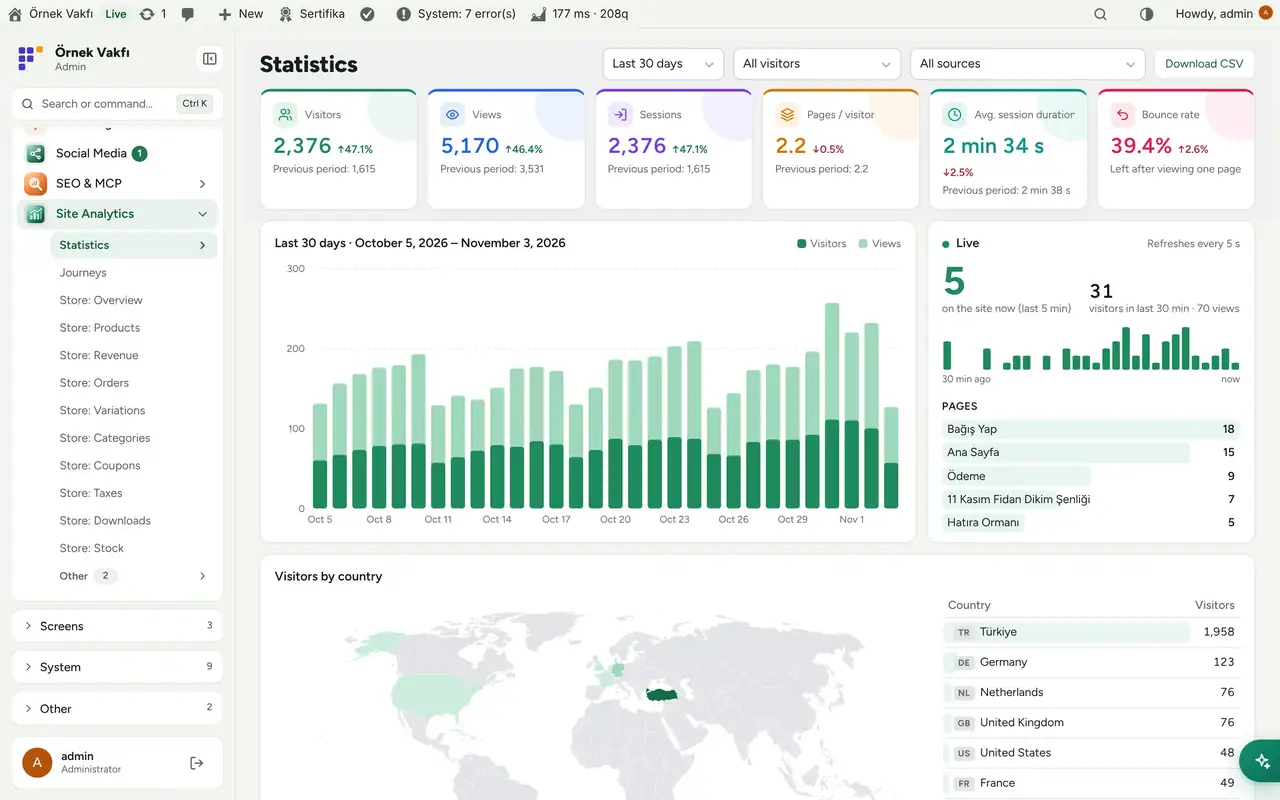
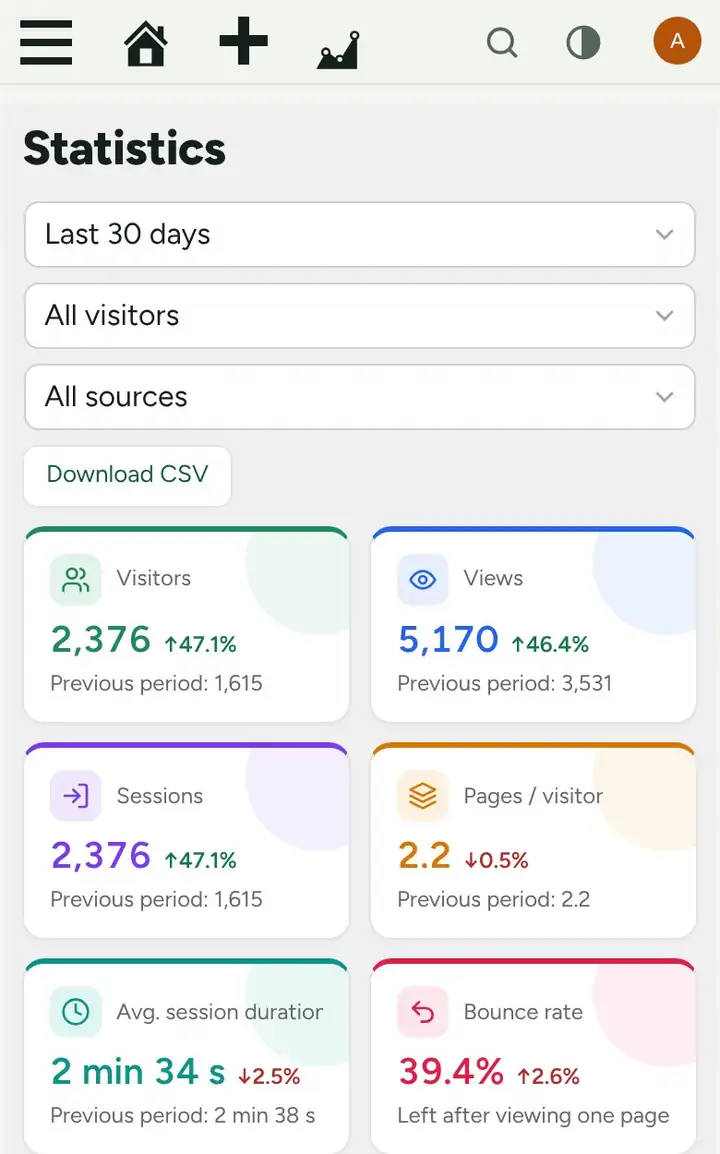
- Six headline cards: visitors, views, sessions, pages per visitor, average session duration and bounce rate, each compared with the previous period.
- Date ranges (today, 7/30/90 days, months, years, custom), a daily chart and a Live panel that refreshes every 5 seconds.
- World map and country list. The country comes from the browser’s time zone, never from the IP.
- Pages (click one for its own chart), referring sites, channels (search, social, AI assistants, email, ads, campaigns, referral links), device, browser, OS, language, UTM campaigns, 404 pages and CSV export.
- Visitor type filter on every screen: everyone, outside visitors only, logged-in users, or a single role.
Donation funnel
- Default steps: site entry → donation page → checkout page → started the form → clicked “Place order” → donation completed. The checkout events are sent automatically on classic and block checkout.
- Break the funnel down by channel, referring site, referral code, role or country.
- Visual funnel editor: up to 5 funnels × 10 steps; each step is a page, an event or the site entry. Drag to reorder, pick pages and events from suggestions.
Journeys
- A step-by-step flow from the entry page (2 to 6 steps): how many visits each box has and what share ended there.
- Most common paths with their share, change from the previous period and goal rate; filter by start page, end page or goal.
- “Group pages” folds sub-pages such as
/news/...into one box.
Referral links
- Create a named link (
?r=ayse) in one click. The visitor gets a 30-day first-party cookie holding only the code, so later pages, later days and the donation are credited to it. - Per link: visitors, sessions, pages per session, average duration, the furthest funnel step reached, and donations (count and amount). Click a row to filter the whole screen to that link.
Events
- Tracked automatically: outbound links, file downloads, phone, email and WhatsApp clicks, site search, and paid WooCommerce donations (type and amount, once per order).
- Your own events:
data-flxan-event="name"on any element,flxan.track()in JavaScript orflxan_track_event()in PHP.
Around WordPress
- Four dashboard widgets: live visitors, visitors, traffic sources and referrals, donation funnel.
- A “Views” column in the post and page lists, the page’s view count in the admin bar, and two shortcodes:
[flx_analiz_populer](most read posts) and[flx_analiz_sayac](view counter). - Imports historical data from Koko Analytics without touching its tables.
- Registers its checks in System Check (Flux Speed) and its
flxan_viewcapability in Flux Roles.
Up and running in a few minutes
- Open Site Analytics › Settings once. The fast collection endpoint is tested automatically; if it doesn’t work, the plugin falls back to REST on its own.
- Visit the site from a browser where you are not logged in. The visit shows up under Site Analytics › Statistics within a few minutes.
- Check the funnel steps under Settings › Funnels (fix the donation page path if it isn’t
/bagis/). - Using LiteSpeed? No extra setting is needed; after changing settings run Purge All.
- Coming from Koko Analytics? Settings › Data › Import Koko Analytics data, then remove Koko.
Requirements: WordPress 6.4+, PHP 7.4+. WooCommerce is optional (needed only for donation events).
Frequently asked questions
Didn't find your answer? Write to us. hello@fluxwp.com
Is Flux Analytics free?
Yes. Flux Analytics is free and open source (GPL-2.0-or-later). There is no licence key and nothing is locked; the source code is on GitHub.
How do I install Flux Analytics?
Install Flux Setup, then press Install on the Flux Analytics row under Flux Setup › Packages. Updates arrive in the standard WordPress Updates screen.
What does Flux Analytics need?
WordPress 6.4 or later and PHP 7.4 or later. Shared hosting is enough. WordPress 6.4+, PHP 7.4+. WooCommerce is optional (needed only for donation events).
Does Flux Analytics work with other plugins?
Flux Analytics works on its own. Installed with other FluxWP plugins it shares the same panel, roles, colours and AI settings, for example with Flux Roles, Flux AI, and Flux Speed.
Is Flux Analytics available in Turkish?
Yes. The interface follows the site language: English and Turkish are included, and other languages can be added with a translation file.
Works well with Flux Analytics
One panel, one look, one settings screen. Add more as you need them.
-

Flux Roles
Admin & platformStaff, manager and admin roles with per-module access you can change from the panel.
Details -
Flux AI
Admin & platformAI for WordPress in one hub: OpenRouter and Anthropic keys, model catalog, budgets and prompt cache for every plugin.
Details -
Flux Speed
Care & infrastructureSpeed optimization starts with knowing what is slow: slow requests, queries, PHP errors and server load.
Details



Start with one plugin. Grow into the whole toolkit.
Install open source FluxWP on your own server for free, or let us host and set it up for you.