


Flux Donate
Product and campaign donations on WooCommerce, with a certificate for every gift.
Flux Donate turns WooCommerce into a donation system: donation types and campaigns with fixed packages, quantities or free amounts, a short donation form, card, bank transfer and monthly giving, donor cards and a dashboard. When a gift is paid, Flux Certificates prepares the certificate and sends it on WhatsApp and e-mail.
- Free and open source (GPL)
- WordPress 6.4+ · PHP 7.4+
- English & Turkish
- Commerce & giving
Flux Donate in action
The real plugin, real screens. A short tour.
Why Flux Donate?
A shop checkout is built for parcels: shipping address, company, postcode, “Place order”. A donor wants to pick “5 units”, write a name for the certificate and pay. Flux Donate keeps WooCommerce’s payments and orders but makes the whole path about giving:
-
Donation types, not products
Packages (1, 5, 10 units), − / + quantities, free amounts with presets, campaigns with a target and dates. Prices always come from the type, never from the browser.
-
A short checkout
One contact block (phone or e-mail), no address, one terms checkbox and a fixed “Pay” bar at the bottom.
-
Card, bank transfer and monthly
Card fields on the page with instalments (iyzico), transfer with a personal reference code and receipt upload, monthly giving with a stored card.
-
Certificates per person
A gift on behalf of several people produces a certificate for each name, sent by WhatsApp and e-mail.
-
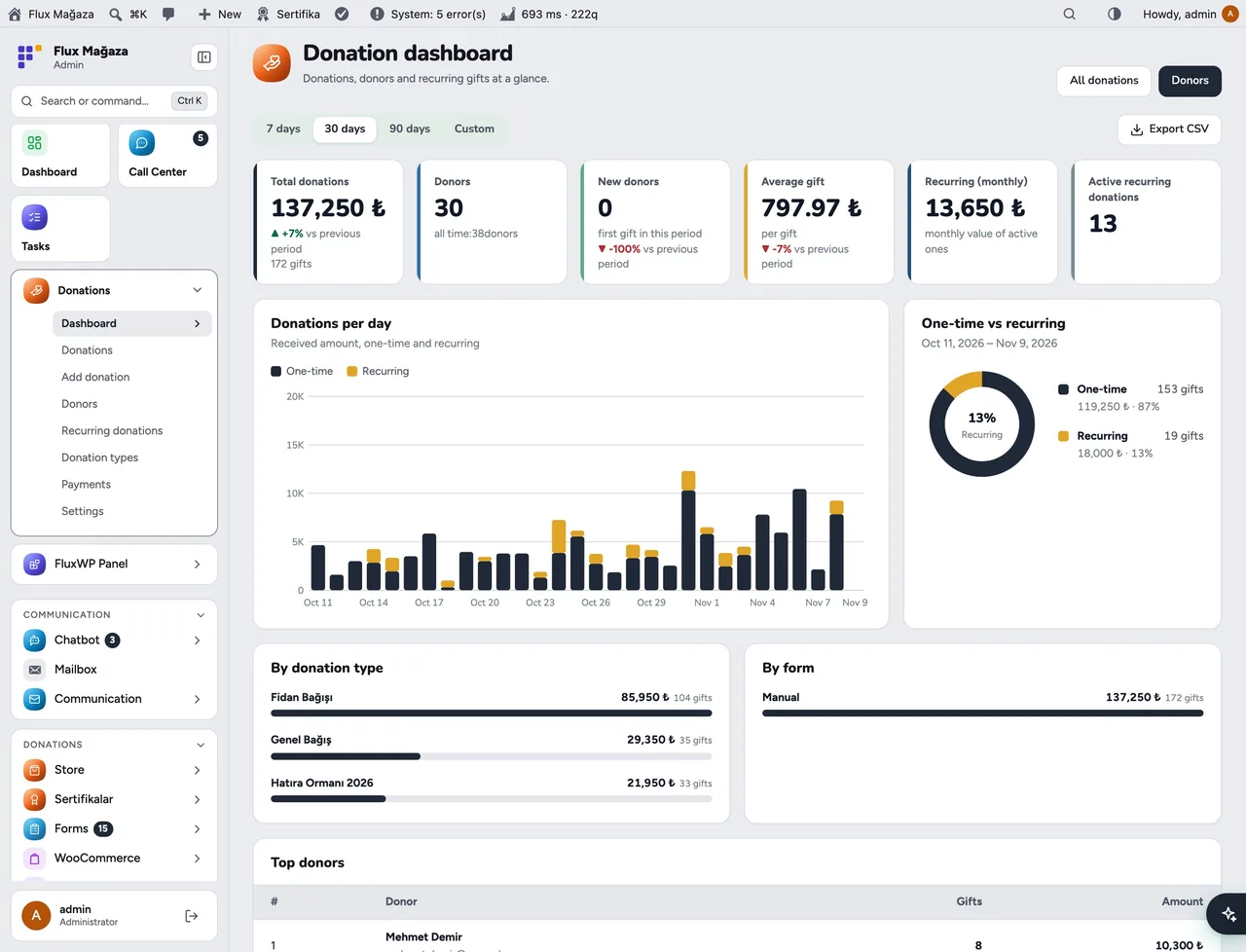
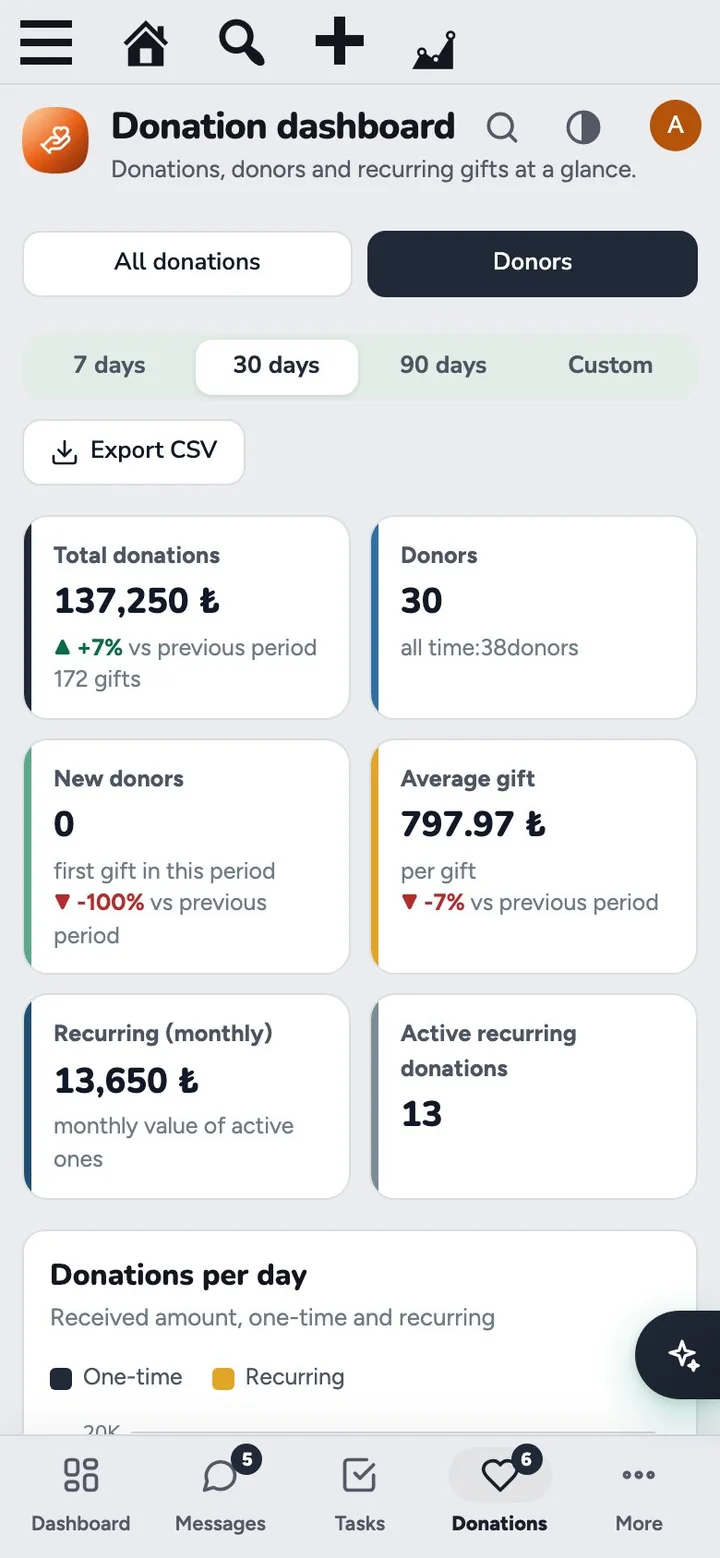
One place for the numbers
totals, donors, recurring income, gifts per type and campaign, top donors.
Flux Donate screenshots
Real screens from the demo site. Click to enlarge.
Flux Donate features
WordPress donation plugin on WooCommerce
Donating
- Donation options block /
[flx_bagis_secenekleri]: types as tabs, package cards with badges (Popular, Best value, Family), − / + quantity, free amount with preset buttons, “Repeat monthly”. - “For myself” or “on behalf of someone else” (the name goes on the certificate), WhatsApp and e-mail for the certificate, “send me a copy too”, donor-selectable certificate designs from Flux Certificates.
- Classic and block checkout with a single contact section, required terms consent and a fixed total bar.
- Bank transfer: IBAN from one place, a personal reference code, receipt upload on the thank-you page or under My account › Pending donations; one click Approve payment sends the certificate.
- Card (iyzico): card fields on the checkout, instalments, 3D Secure, “Save my card”. Monthly giving renews with the stored card and retries after 1 and 3 days.
Managing
- Dashboard: total donations, donors, new donors, average gift, monthly recurring income, active recurring donations, daily chart, one-time vs recurring, per type and per form, top donors, CSV.
- Donations: filters, one row per basket, details with items and names, printable receipt, refund through WooCommerce, approval card for transfers with receipt preview and duplicate-receipt warning.
- Donors: one card per person (matched by phone or e-mail, never by name) with history, recurring gifts, certificates and consents.
- Donation types and campaigns: categories, options and prices, free amounts, quantities, recurring, dates, target with progress, open/closed/archived; sample sets to start from. Each type has a hidden WooCommerce product.
- Add donation for cash or transfers received elsewhere; referrals per donation with Flux Roles, staff see only their own.
Up and running in a few minutes
- Install and activate WooCommerce (currency TRY), then Flux Donate.
- Donations › Donation types: create a type (or Load sample types) and tick Show in the Donation options block.
- Donations › Settings › WooCommerce › Create the online donation page, then enable Bank transfer (donation) and Card (iyzico) under WooCommerce › Settings › Payments.
- Open Settings › System check (or Performance › System Check with Flux Speed) and fix any red rows.
Requirements: WooCommerce 8.0+. Optional: Flux Certificates 1.2+ (certificates), Flux Mail (e-mails, WhatsApp), Flux Forms 2.1+ (payment forms), the iyzico WooCommerce plugin.
Frequently asked questions
Didn't find your answer? Write to us. hello@fluxwp.com
Is Flux Donate free?
Yes. Flux Donate is free and open source (GPL-2.0-or-later). There is no licence key and nothing is locked; the source code is on GitHub.
How do I install Flux Donate?
Install Flux Setup, then press Install on the Flux Donate row under Flux Setup › Packages. Updates arrive in the standard WordPress Updates screen.
What does Flux Donate need?
WordPress 6.4 or later and PHP 7.4 or later. Shared hosting is enough. WooCommerce 8.0+. Optional: Flux Certificates 1.2+ (certificates), Flux Mail (e-mails, WhatsApp), Flux Forms 2.1+ (payment forms), the iyzico WooCommerce plugin.
Does Flux Donate work with other plugins?
Flux Donate works on its own. Installed with other FluxWP plugins it shares the same panel, roles, colours and AI settings, for example with Flux Roles, Flux Mail, and Flux Forms.
Is Flux Donate available in Turkish?
Yes. The interface follows the site language: English and Turkish are included, and other languages can be added with a translation file.
Works well with Flux Donate
One panel, one look, one settings screen. Add more as you need them.
-

Flux Roles
Admin & platformStaff, manager and admin roles with per-module access you can change from the panel.
Details -
Flux Mail
CommunicationEvery site email in one place: SMTP, branded mobile-friendly templates and a mailbox.
Details -
Flux Forms
CommunicationDrag-and-drop form builder: multi-step forms, Stripe payments, conditional logic and automations.
Details



Start with one plugin. Grow into the whole toolkit.
Install open source FluxWP on your own server for free, or let us host and set it up for you.